
If you're looking to amp up your trading game, the Exp_TSI_CCI Expert Advisor is worth checking out. This EA leverages signals generated by the TSI_CCI oscillator to help you make informed trading decisions.
So, how does it work? The EA produces a signal when a bar closes, but only if there's a change in the color of the indicator's cloud. This can be a crucial moment to enter or exit a trade!
To ensure the EA runs smoothly, make sure to place the compiled indicator file TSI_CCI.ex5 in your terminal_data_folder/MQL5/Indicators directory.
It's also important to note that the TradeAlgorithms.mqh library file allows you to use Expert Advisors with brokers offering a nonzero spread. This means you can set both Stop Loss and Take Profit right when you open a position. If you want to explore more options, check out this link for additional variants of the library: Trade Algorithms.
For the tests shown below, we used the default input parameters of the EA, without applying Stop Loss or Take Profit.
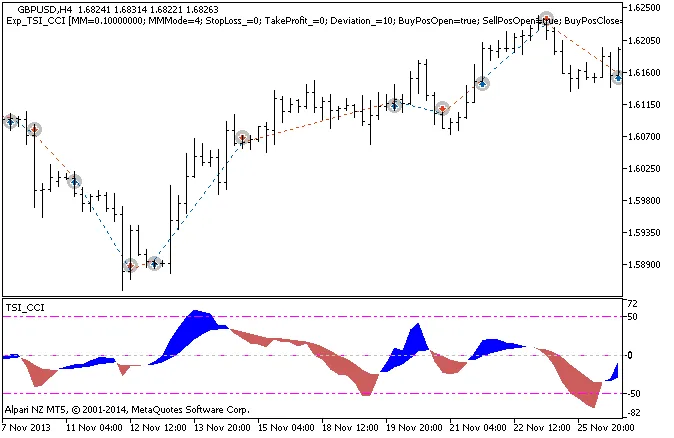
Figure 1: The instances of history of deals on the chart.
Now, let’s take a look at the testing results for 2013 using the USDJPY on the H4 timeframe:
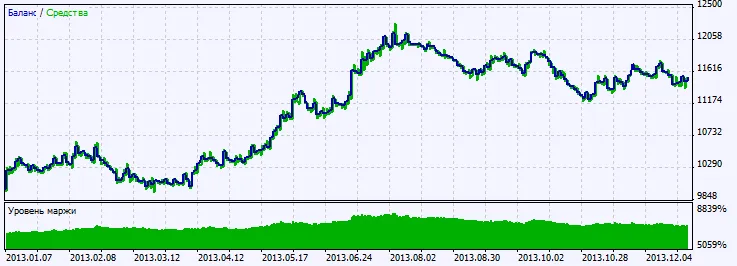
Figure 2: Chart of testing results.




Comments 0