
Welcome back, fellow traders! Today, we're diving into an exciting trading tool: the Exp_XWAMI_NN3_MMRec Expert Advisor (EA) for MetaTrader 5. This powerful EA integrates three independent trading systems using XWAMI indicators, designed to adapt your trade volume based on the performance of previous trades.
The beauty of this EA lies in its ability to generate trading signals right at the bar close, ensuring you're acting when the trend shifts, as indicated by a change in color across any of the three indicators.
Volume Management Made Easy
One of the standout features of this EA is its input blocks, which allow you to manage the volumes of your open positions. Let’s break it down with our first trading system:
inputuint A_BuyTotalMMTriger=5; //Number of the last Buy trades for stop loss calculationinputuint A_BuyLossMMTriger=3; //Number of losing Buy trades to reduce MMinputuint A_SellTotalMMTriger=5;//Number of the last Sell trades for stop loss calculationinputuint A_SellLossMMTriger=3; //Number of losing Sell trades to reduce MMinputdouble A_SmallMM=0.01; //Share of deposit per deal in case of lossinputdouble A_MM=0.1; //Share of deposit per deal during normal tradinginput MarginMode A_MMMode=LOT; //Lot setting mode
With these inputs, if you look back at your last five trades and find that three were losses in the same direction, the EA will open the next trade in that direction with a volume of 0.01 lots. If you have fewer than three losing trades, it will use a position volume of 0.1 lots instead.
Customizing Your Trading Systems
The second trading system follows a similar structure:
inputuint B_BuyTotalMMTriger=5; //B number of the last Buy trades for stop loss calculationinputuint B_BuyLossMMTriger=3; //B number of losing Buy trades to reduce MMinputuint B_SellTotalMMTriger=5;//B number of the last Sell trades for stop loss calculationinputuint B_SellLossMMTriger=3; //B number of losing Sell trades to reduce MMinputdouble B_SmallMM=0.01; //B share of deposit per deal in case of lossinputdouble B_MM=0.1; //B share of deposit per deal during normal trading
For the third system, you'll notice inputs prefixed with C_.
Optimizing Your EA Setup
The best practice for setting up this EA is to configure each trading system separately while disabling the others. You can easily do this by using parameters like:
inputbool B_BuyPosOpen=true; //B permission to open long positionsinputbool B_SellPosOpen=true //B permission to open short positions
Simply set them to false to disable.
For everything to work smoothly, ensure that the compiled XWAMI.ex5 indicator file is located in the <terminal_data_directory>\MQL5\Indicators folder.
In our tests, we’ve used the default EA input parameters with stops, and the results have been promising. Check out the charts below:
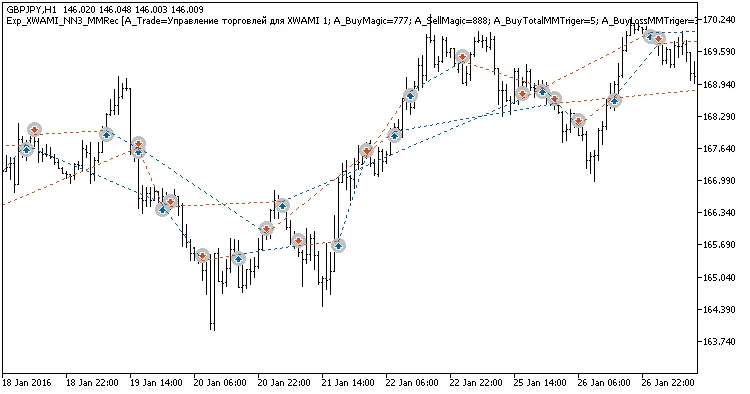
Fig. 1. Example trades on the chart
These tests were conducted on GBPJPY across H1, H4, and H8 timeframes throughout 2016.
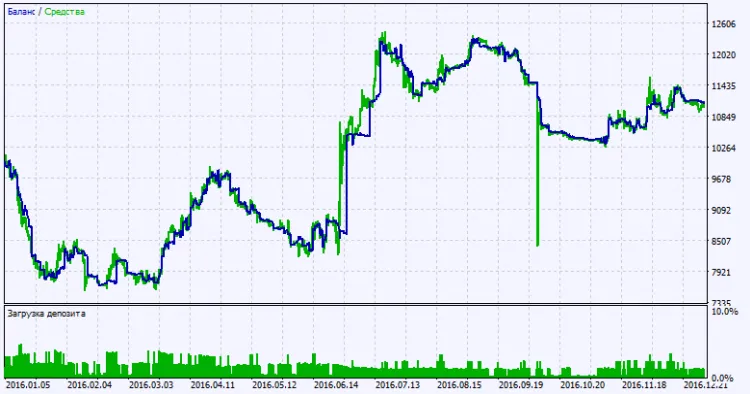
Fig. 2. Test results chart




Comments 0