
If you're looking to elevate your trading game, let me introduce you to a fantastic trading system that harnesses the power of the FiboCandles indicator. This Expert Advisor (EA) generates trading signals based on color changes of the indicator's candlesticks. Specifically, a signal is triggered when the candlestick color shifts from pink to green or vice versa at the close of a bar.
To get started, you'll need to download the compiled indicator file, FiboCandles.ex5. Make sure to save it in your <terminal_data_folder>\MQL5\Indicators directory so that the EA can access it properly.
One thing to note: the TradeAlgorithms.mqh library file is essential for using EAs with brokers that offer a nonzero spread. This allows you to set your Stop Loss and Take Profit levels right when you enter a trade. If you want to explore more versions of this library, you can find them here: Trade Algorithms.
For the tests shown below, we utilized the default input parameters of the Expert Advisor. It's worth mentioning that neither Stop Loss nor Take Profit was engaged during these tests.
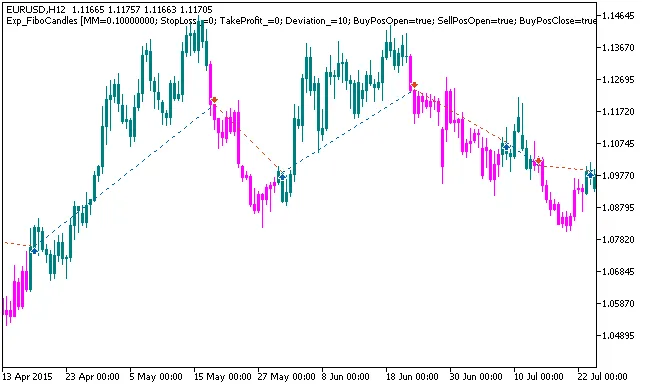
Fig. 1. Examples of trades on the chart
Here are the testing results for 2015 on the EURUSD H12 timeframe:
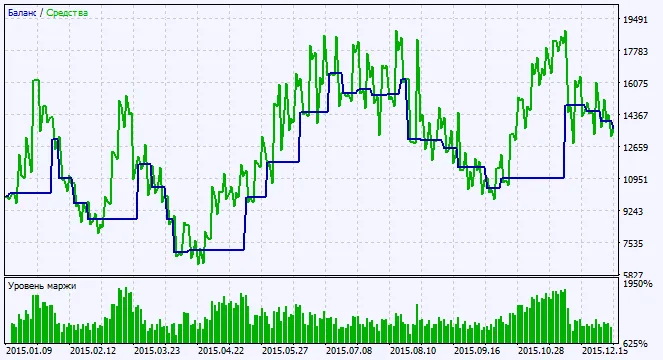
Fig. 2. Chart of testing results




Comments 0