
If you’re looking to up your trading game, the SuperWoodiesCCI EA might just be the tool you need. Built on the signals from the SuperWoodiesCCI indicator, this trading system is designed to help you make informed decisions right when the market closes after a breakout from the zero level.
To get started, simply place the SuperWoodiesCCI.ex5 file into your terminal's terminal_data_folder/MQL5/Indicators directory.
One of the standout features of this Expert Advisor is its ability to automatically display the SuperWoodiesCCI indicator on your current chart. You won’t have to mess around with manual installations; once you drop the EA onto your chart, the indicator will pop up automatically. Plus, it’s worth noting that the input parameters for the indicator match the ones for the EA, ensuring consistency. Just a heads up: the indicator will only show up if the timeframe aligns with the chart you're working on!
The testing that follows utilizes the default input parameters of the Expert Advisor, and interestingly, Stop Loss and Take Profit settings weren’t used during these tests.
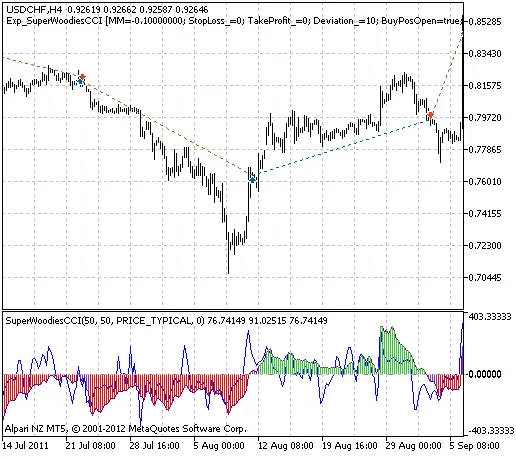
Fig. 1. The instances of history of deals in the chart.
Here are the testing results for USDCHF on the H4 timeframe from 2011:
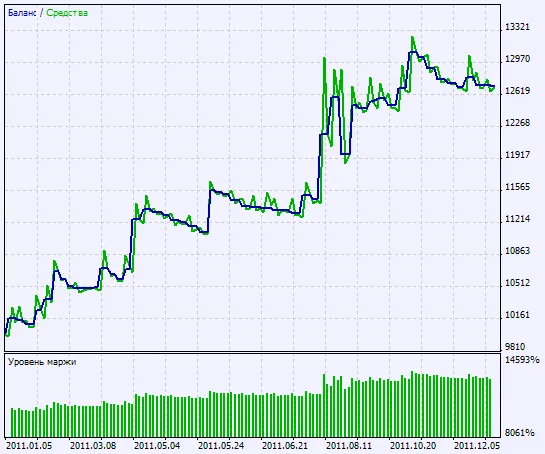
Fig. 2. Chart of testing results




Comments 0