
Hey there, fellow traders! Today, we're diving into the Aroon Up & Down indicator for MetaTrader 4. This nifty tool is designed to help you spot the local peaks and troughs on your charts, giving you clear signals for buying and selling currency pairs.
When the price bounces up from a low, or dips down from a high, this indicator helps you make informed decisions. The magic happens when the two indicator lines cross; this can be your cue to take profits or exit a trade with minimal loss. Plus, you can set it up to send you sound and email alerts whenever these crucial crosses occur. And don't worry, it works seamlessly on both MT4 and MT5 platforms!
Input Parameters
- AroonPeriod (default = 14) — This is the timeframe in chart bars that the indicator uses to identify highs and lows. Just like with other indicators, a longer period smooths out the lines, while a shorter one generates more signals.
- MailAlert (default = false) — Turn this on if you want to receive email notifications whenever the lines cross. Just make sure your MetaTrader email options are set up!
- SoundAlert (default = false) — Activate this feature to get a simple sound and visual alert when the lines cross.
Example of Aroon Up & Down Indicator on a MetaTrader Chart
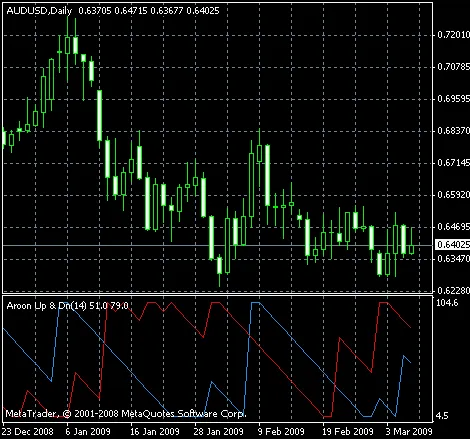
As you can see in the chart above, trading with the Aroon indicator is straightforward! Here’s a quick rundown:
- Buy when the blue line rises from the bottom and the red line is hovering around the middle of the range.
- Sell when the blue line falls from the top and the red line is also near the middle.
- Exit for profit, or minimize losses when the red line hits the opposite side of the range.
Trading can be a breeze if you stick to this strategy. Give the Aroon Up & Down indicator a spin and see how it works for your trading style!




Comments 0