
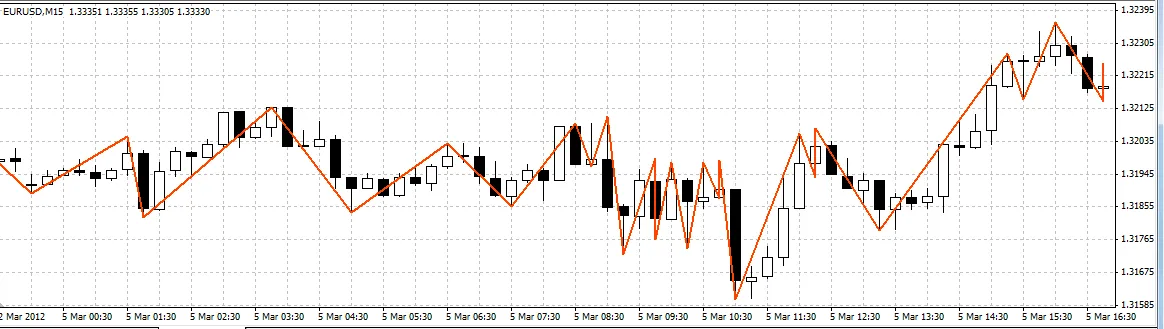
Why You Should Consider the Ideal ZigZag Indicator
- Revolutionary peak retrieval: The iBarShift function eliminates the need for cycles in peak data retrieval, making it far more efficient.
- Access to real-time data: You can retrieve all necessary information to construct ZigZag patterns for every bar instantly.
- No more suspended peaks: This indicator operates smoothly without interruptions.
- Peak-finding made easy: It employs a highly efficient method for identifying peaks.
- Lightning-fast performance: Experience quick calculations and responses.
- Reliable with history insertions: Works perfectly when switching timeframes (TFs).
- Ideal for Expert Advisors (EAs): This indicator is a great fit for automated trading systems.
What to Watch Out For
1. **Memory usage**: The Ideal ZigZag uses five buffers compared to the typical two or even one in other indicators. However, I believe this is a fair trade-off for the advantages offered, especially in terms of efficiency and handling historical data without a full rebuild.
2. **Additional lines**: These lines are necessary for external codes but should remain hidden from view.
Understanding the Principle:
The ZigZag is constructed based on a channeling principle. You can define the channel width in Points (XLab_ZZ) or in Percent (XLab_ZZP).
How the Indicator Retrieves Peaks:
externint ChannelWidth = 100;

#property indicator_chart_window#property indicator_buffers 1#property indicator_color1 Red#property indicator_width1 3datetime LastTime;

int init()
{
   LastTime = 0;

   return(0);
}

bool GetValue(double dir, int bar, int prevBar, double& peak, int& peakBar, datetime& peakTime)
{
   if (dir < 0)
   {
      datetime t = iCustom(Symbol(), 0, "XLab_ZZ", ChannelWidth, 2, bar);
      int i = iBarShift(Symbol(), 0, t);

      if (i == prevBar)
      {
         t = iCustom(Symbol(), 0, "XLab_ZZ", ChannelWidth, 2, bar + 1);
         i = iBarShift(Symbol(), 0, t);
      }

      double v = iCustom(Symbol(), 0, "XLab_ZZ", ChannelWidth, 1, i);

      if (v == EMPTY_VALUE)
      {
         t = iCustom(Symbol(), 0, "XLab_ZZ", ChannelWidth, 2, bar + 1);
         i = iBarShift(Symbol(), 0, t);
         v = iCustom(Symbol(), 0, "XLab_ZZ", ChannelWidth, 1, i);
      }
      peak = v;
      peakBar = i;
      peakTime = t;
   }
   elseif (dir > 0)
   {
      t = iCustom(Symbol(), 0, "XLab_ZZ", ChannelWidth, 3, bar);
      i = iBarShift(Symbol(), 0, t);

      if (i == prevBar)
      {
         t = iCustom(Symbol(), 0, "XLab_ZZ", ChannelWidth, 3, bar + 1);
         i = iBarShift(Symbol(), 0, t);
      }

      v = iCustom(Symbol(), 0, "XLab_ZZ", ChannelWidth, 0, i);

      if (v == EMPTY_VALUE)
      {
         t = iCustom(Symbol(), 0, "XLab_ZZ", ChannelWidth, 3, bar + 1);
         i = iBarShift(Symbol(), 0, t);
         v = iCustom(Symbol(), 0, "XLab_ZZ", ChannelWidth, 0, i);
      }
      peak = v;
      peakBar = i;
      peakTime = t;
   }
   else
   {
      return (false);
   }

   return (true);
}

int start()
{
   if (LastTime == Time[0]) return (0);
   LastTime = Time[0];

   double dir = iCustom(Symbol(), 0, "XLab_ZZ", ChannelWidth, 4, 1);
   double rdir = -dir;

   if (dir == EMPTY_VALUE) return (0);

   double v1, v2, v3, v4, v5;
   int    i1, i2, i3, i4, i5;
   datetime t1, t2, t3, t4, t5;

   GetValue(dir, 1, 0, v1, i1, t1);
   GetValue(rdir, i1, 0, v2, i2, t2);
   GetValue(dir, i2, i1, v3, i3, t3);
   GetValue(rdir, i3, i2, v4, i4, t4);
   GetValue(dir, i4, i3, v5, i5, t5);

   SetPt("1", v1, t1);
   SetPt("2", v2, t2);
   SetPt("3", v3, t3);
   SetPt("4", v4, t4);
   SetPt("5", v5, t5);

   Print(v1, "   ", v2, "  ", v3, "  ", v4, " ", v5, " ", i1, "  ", i2, "  ", i3, " ", i4, " ", i5);

   return(0);
}

void SetPt(string name, double price, datetime time)
{
   ObjectCreate(name, OBJ_ARROW, 0, time, price);
   ObjectSet(name, OBJPROP_ARROWCODE, 108);
   ObjectSet(name, OBJPROP_PRICE1, price);
   ObjectSet(name, OBJPROP_TIME1, time);
}
This code example marks the first five peaks (including the current one) on each bar.
Important! This code may not function correctly if the 0th Bar Mode is activated.
About 0th Bar Mode:
This feature is controlled by the DrawZeroBar variable and is off by default. It's not recommended to use this option, especially if you plan to incorporate the indicator into an EA.
Happy trading! If you have any questions or run into bugs, don't hesitate to reach out. Thanks for reading!




Comments 0