
Description:
Looking to streamline your trading process? This Expert Advisor (EA) simplifies your trading strategy by drawing four essential lines: the BUY LINE, SELL LINE, and two CLOSE lines.
Your job is to adjust these lines to the prices you want to target for buying, selling, or closing your trades. When the price crosses one of these lines, your orders will automatically trigger. For instance, if the Ask price crosses the BUY LINE, a buy order will be executed. The same goes for the SELL LINE and the CLOSE lines.
Image:
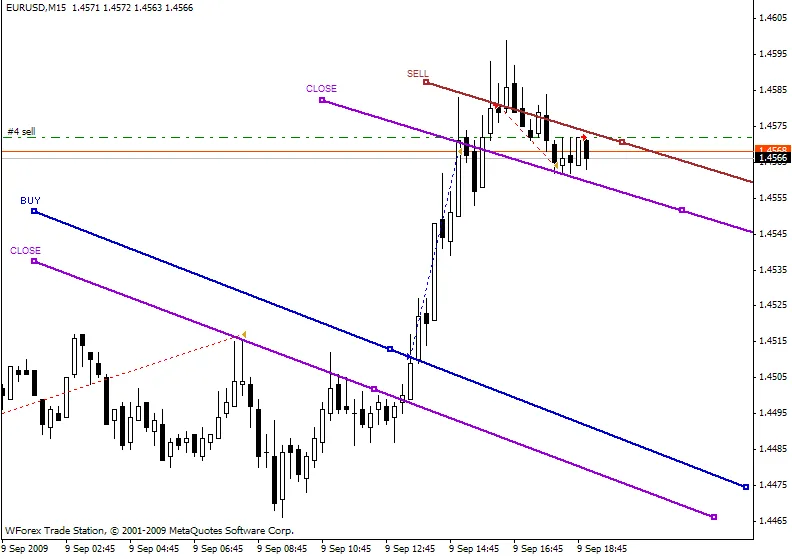
Check out the trade example illustrated in the image above.
You can customize the number of lines you use by employing the following commands:
- DRAW_SELL - to draw a Sell line
- DRAW_BUY - to draw a Buy line
- DRAW_CLOSE1 - to draw the first Close line
- DRAW_CLOSE2 - to draw the second Close line
There are a couple of external variables available: lot - which sets your lot size, and order - which determines the maximum number of orders allowed. You can also use the CLOSE lines for a trailing stop—just pick the right angle!
This Expert Advisor is built on the concept of signal lines with alerts after crossing. For more solutions, feel free to check out my other work here. Good luck and happy trading!
Editor's Note:
Please note that this is a localized version of the original Russian text.
If you have any questions, suggestions, or comments for the author, it’s best to post them there.
If you find this code helpful for your trading or educational purposes, please consider expressing your gratitude to the author!




Comments 0