
If you're looking to level up your trading game, the Exp_AdaptiveCGOscillator_X2 trading system is worth your attention. This system uses signals from two AdaptiveCGOscillator indicators to help you identify trends effectively. The first indicator gives you the slow trend direction based on the positioning of its main and signal lines. Meanwhile, the second one signals when to open a trade, triggered by line crossovers or touches. A trading signal is generated when a bar closes under two conditions:
- Both fast and slow trend signals align;
- The direction of the fast trend shifts.
Input Parameters for the Expert Advisor:
//| Input parameters of the EA indicator |
//+-------------------------------------------------+
inputstring Trade="Trade management"; //+============== TRADE MANAGEMENT ==============+
inputdouble MM=0.1; // Share of deposit per trade
input MarginMode MMMode=LOT; // Lot value detection method
inputuint StopLoss_=1000; // Stop Loss in points
inputuint TakeProfit_=2000; // Take Profit in points
inputstring MustTrade="Trade permissions"; //+============== TRADE PERMISSION ==============+
inputint Deviation_=10; // Max price deviation in points
inputbool BuyPosOpen=true; // Permission to enter long positions
inputbool SellPosOpen=true; // Permission to enter short positions
//+-------------------------------------------------+
//| Input parameters of the filter indicator |
//+-------------------------------------------------+
inputstring Filter="PARAMETERS FOR SLOW TREND"; //+============== PARAMETERS FOR SLOW TREND ==============+
inputENUM_TIMEFRAMES TimeFrame=PERIOD_H6; // 1 Chart period for the trend
inputdouble Alpha=0.07;// Indicator smoothing ratio
inputuint SignalBar=1; // Bar index for entry signal
inputbool BuyPosClose=true; // Close long positions by trend
inputbool SellPosClose=true; // Close short positions by trend
//+-------------------------------------------------+
//| Input parameters of the entry indicator |
//+-------------------------------------------------+
inputstring Input="ENTRY PARAMETERS"; //+=============== ENTRY PARAMETERS ===============+
inputENUM_TIMEFRAMES TimeFrame_=PERIOD_M30; // 2 Chart period for entry
inputdouble Alpha_=0.07;// Indicator smoothing ratio
inputuint SignalBar_=1;// Bar index for entry signal
inputbool BuyPosClose_=false; // Close long positions by signal
inputbool SellPosClose_=false; // Close short positions by signal
//+-------------------------------------------------+
The string parameters in the input section are there to improve the visual experience when setting up the EA. Keep in mind that the AdaptiveCGOscillator_Cloud_HTF indicators included in this EA are primarily for visualizing trends during strategy testing and are inactive in other modes.
To get started, simply place the compiled files AdaptiveCGOscillator.ex5, CyclePeriod.ex5, and AdaptiveCGOscillator_Cloud_HTF.ex5 into your <terminal_data_folder>\MQL5\Indicators.
Also, note that the TradeAlgorithms.mqh library file enables the use of Expert Advisors with brokers that offer nonzero spreads, allowing you to set Stop Loss and Take Profit when opening a position. You can explore more variations of this library by following this link: Trade Algorithms.
In the tests below, we used the default input parameters for the Expert Advisor, and neither Stop Loss nor Take Profit were applied.

Fig. 1. Examples of deals on the chart
Testing results from 2015 on EURUSD, observing slow trends on H6, with entry signals based on fast trends on M30:
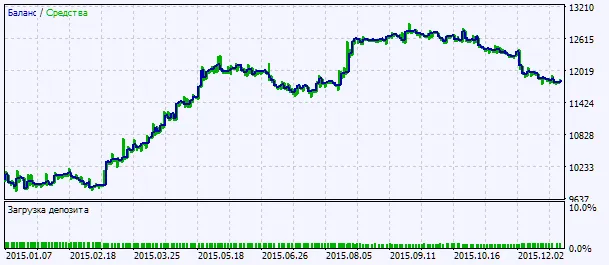
Fig. 2. Chart of testing results




Comments 0