
If you’re looking to level up your trading game, the iStochKomposter trading system is a solid choice. This Expert Advisor (EA) generates signals based on the iStochKomposter indicator, and you'll know a signal is ready when a colored icon appears at the close of a bar.
To get started, make sure you have the compiled indicator file, iStochKomposter.ex5. Simply drop it into your <terminal_data_folder>\MQL5\Indicators directory to ensure everything runs smoothly.
It's also worth noting that the TradeAlgorithms.mqh library is essential for using EAs with brokers that offer a nonzero spread. This library allows you to set Stop Loss and Take Profit right when you open a position. If you're interested in exploring other variations of this library, check it out here: Trade Algorithms.
For the tests shown below, we used the default input parameters for the EA. Just a heads-up: the tests didn’t include Stop Loss or Take Profit settings.
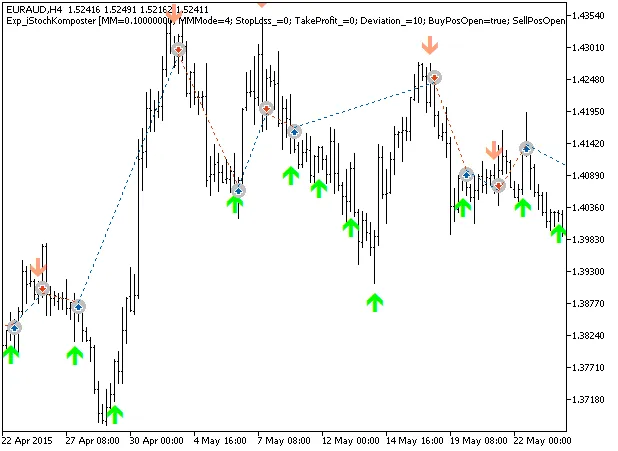
Fig. 1. The instances of history of deals on the chart.
Now, let’s dive into the testing results for 2015 on the EURAUD H4:
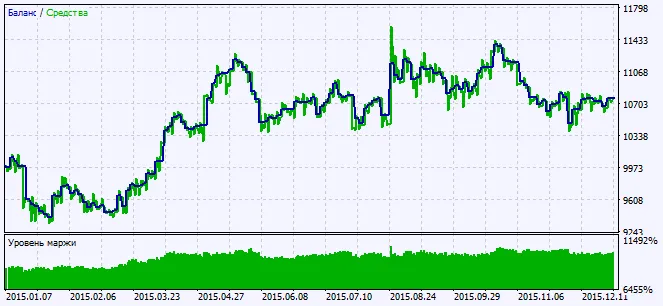
Fig. 2. Testing results chart




Comments 0