
Are you ready to level up your trading game? The Trend Line EA for MetaTrader 4 is here to help you ride the market waves! This handy Expert Advisor automatically draws trend lines on your chart and executes trades that align with those trends. Plus, it comes equipped with a trailing stop loss and take profit feature, making it a versatile tool for all timeframes, major forex pairs, and even NASDAQ stocks.
Key Features:
- Start off on a demo account to get a feel for it.
- This EA trades based solely on the price of the open candle!
- If you’re not keen on increasing lot sizes after a loss, simply set: IncreaseFactor=0.
- I've combined a simple EA with two moving averages and trend lines for a robust trading strategy.
- Note that the trend line feature does not work in test mode.
- Optimization tests can only be conducted with moving averages.
- In live trading, the trend line and moving averages collaborate to enhance your strategy.
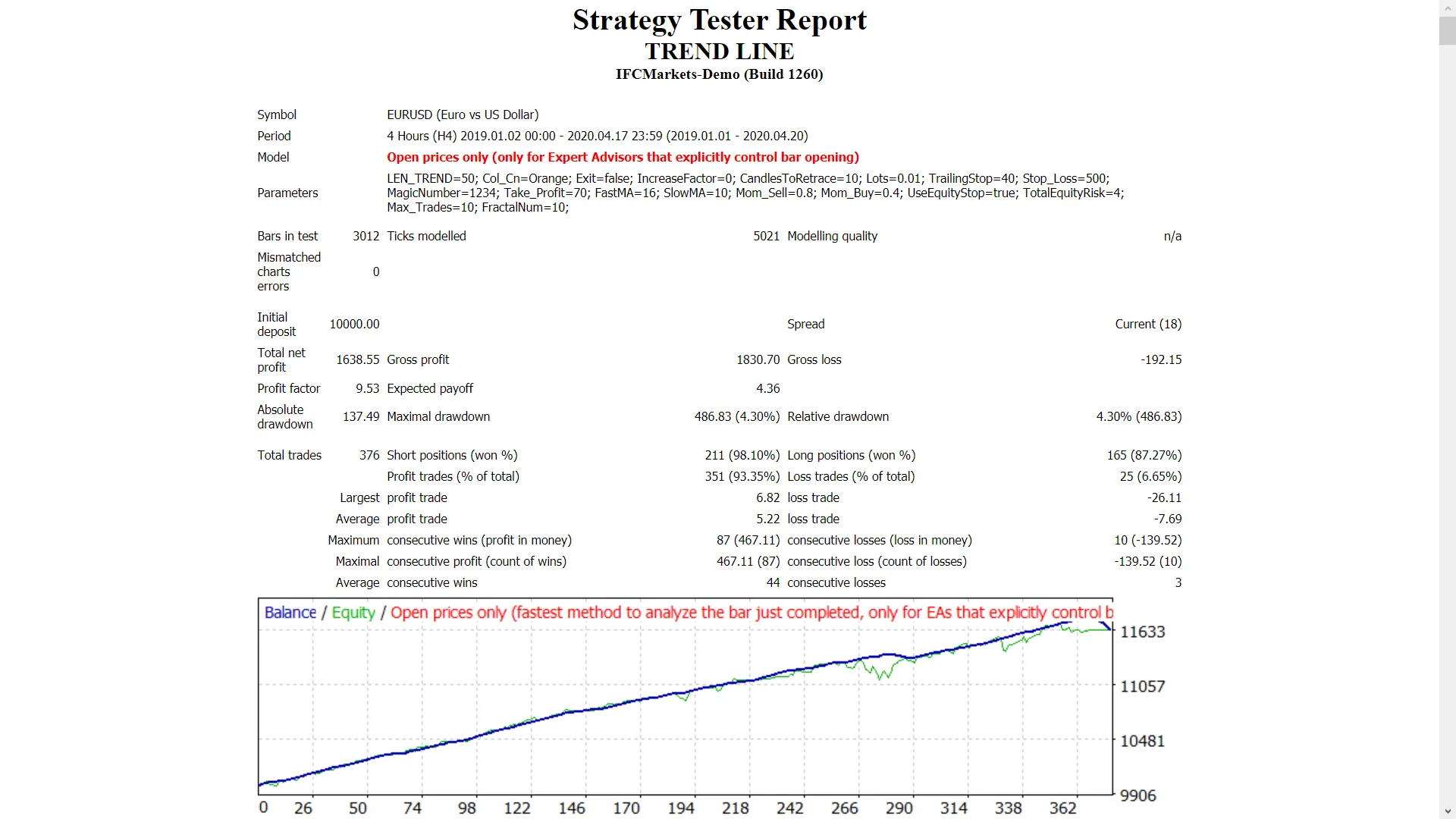
- During backtesting, the EA will only draw the trend line visually without factoring it into trades.
- The trend line acts as a filter, increasing your chances of winning trades.
Input Parameters:
- Use_TP_In_Money - Set to true/false for take profit in money.
- TP_In_Money - Adjust take profit in money (values: 10-100).
- Use_TP_In_percent - Set to true/false for take profit in percentage.
- TP_In_Percent - Adjust take profit in percentage (values: 10-100).
- ----------------------------------
- Enable_Trailing - Activate trailing stop in money (values: true/false).
- Take Profit In Money (in current currency) (values: 25-100).
- Stop Loss In Money (in current currency) (values: 1-20).
- ----------------------------------
- Trend Line length - Set the bar count (values: 10-100).
- Trend Line color.
- Exit - Close trades if the trend goes against you (values: true/false).
- Lots - Set the lot size (values: 0.01-1).
- Lots size Exponent (values: 1.01-2).
- IncreaseFactor - Define how much to increase lots after a loss (values: 0.001-0.1).
- Stop_Loss - Set stop loss value (values: 10-100). Use 600 for multiple trades.
- MagicNumber - Assign a magic number (values: 1-100000).
- TakeProfit - Set take profit value (values: 10-100). Use 600 for multiple trades.
- FastMA - Set fast moving average (values: 1-20).
- SlowMA - Set slow moving average (values: 50-200).
- Mom_Sell - Set momentum sell trigger (values: 0.1-0.9).
- Mom_Buy - Set momentum buy trigger (values: 0.1-0.9).
- ----------------------------------
- UseEquityStop - Enable equity stop (values: true).
- TotalEquityRisk - Set risk level (values: 0.01-20).
- ----------------------------------
- Max_Trades - Set maximum trades (values: 1-12).
- FractalNum - Set the number of fractal highs and lows (values: 2-10).
- ----------------------------------
- If using only 1 trade, here are additional settings:
- USETRAILINGSTOP - Enable trailing stop (values: true/false).
- WHENTOTRAIL - Set trailing activation point (values: 40-100).
- TRAILAMOUNT - Set trail amount (values: 40-100).
- Distance From Candle - Set distance from candle (values: 1-100).
- USECANDELTRAIL - Enable candle trailing (values: true/false).
- X - Set number of candles (values: 1-100).
- USEMOVETOBREAKEVEN - Enable break-even feature (values: true/false).
- WHENTOMOVETOBE - Set when to move to break-even (values: 1-30).
- PIPSTOMOVESL - How many pips to move stop loss (values: 1-30).
Pro Tip: Make sure to optimize this EA every few months using the exact input parameters above. You can use it as a hedging grid EA or a single trade EA.
To learn how to perform back tests, check out this link.




Comments 0