
Welcome to the exciting world of automated trading! Today, we’re diving into the up3x1 Krohabor D Expert Advisor (EA) for MetaTrader 5, originally crafted by izhutov and available for you to explore here. Whether you’re a seasoned trader or just starting out, this EA has some fascinating features that can enhance your trading experience.
How It Works
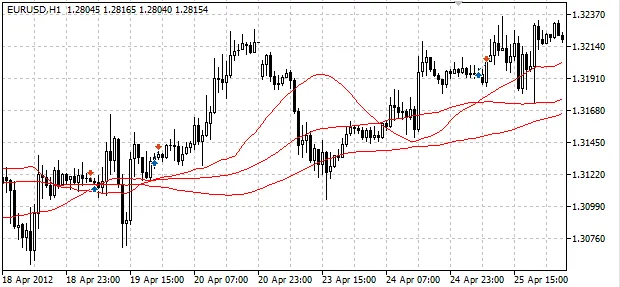
The up3x1 EA utilizes three moving averages (MA) to identify trading opportunities.
Buying Conditions:
- The fast moving average crosses above the middle moving average.
- The fast MA is above the slow MA.
- The fast MA was above the slow MA in the previous bar.
- The middle MA is also above the slow MA.
Selling Conditions:
- The fast moving average crosses below the middle moving average.
- The fast MA is below the slow MA.
- The fast MA was below the slow MA in the previous bar.
- The middle MA is also below the slow MA.
Essentially, the buying and selling conditions are reflections of each other, allowing for a straightforward approach to market entry and exit.
This EA also offers flexibility in position sizing. You can set a fixed lot size or choose to have it adjust based on your free margin. Plus, it features a unique function to reduce your lot size after consecutive losses—helping to manage risk effectively. And if that wasn’t enough, you can set a trailing stop for open positions to lock in profits as the market moves in your favor.
Take a look at the performance of the up3x1 Krohabor D EA in action below:
Parameters
- MaximumRisk: Risk level (used when Lots=0).
- Lots: The size of the lot for each trade.
- DecreaseFactor: Factor for reducing lot size after losing trades (0 disables reduction; smaller values increase reduction).
- TakeProfit: Take Profit level in points.
- StopLoss: Stop Loss level in points.
- TrailingStop: Trailing Stop level in points (set to 0 to disable).
- FastPeriod: The period for the fast MA.
- FastShift: The shift for the fast MA.
- MiddlePeriod: The period for the middle MA.
- MiddleShift: The shift for the middle MA.
- SlowPeriod: The period for the slow MA.
- SlowShift: The shift for the slow MA.
Note: It’s best to avoid setting FastShift, MiddleShift, and SlowShift values below 1. The EA checks the indicators on the zero bar only when a new bar opens, meaning it won’t operate on the current forming bar. The original version doesn’t have external parameters for moving averages.
Happy trading, and may the pips be ever in your favor!




Comments 0