
Hey fellow traders! Today, let's dive into a trading system that utilizes the Vortex Indicator. This setup is particularly intriguing because it generates signals when the color of the cloud changes at the close of a bar. Essentially, you'll want to enter a trade based on this color shift, and when it’s time to exit, you can either use a pending order or close your position when the cloud flips to the opposite color.
To get started, you’ll need to place the VortexIndicator.ex5 file in your terminal’s data folder under MQL5\Indicators. It’s a straightforward process, but make sure you’ve got it in the right spot!
For the results presented below, we used the default input parameters of the Expert Advisor during our tests. Notably, we didn’t employ any Stop Loss or Take Profit, which can sometimes skew the results but gives us a clearer picture of the system’s performance.
Visual Insights:
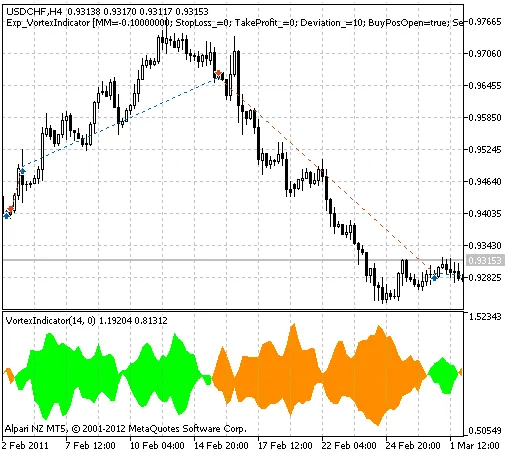
Fig. 1. The instances of history of deals in the chart.
Now, let’s take a look at the testing results for the USDCHF pair on the H4 timeframe during 2011:
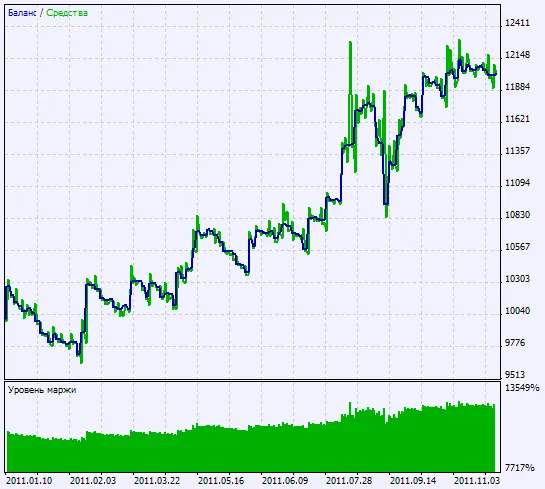
Fig. 2. Chart of testing results




Comments 0