
If you're a trader looking to enhance your strategy, the Limits Martin EA for MetaTrader 4 is worth your attention. The upgraded version introduces a handy feature that lets you choose between different types of pending orders using the Limits0_or_Stops1 parameter. Setting this to 0 enables limit orders, while 1 activates stop orders.
We've also added some fantastic functionalities like trailing stops and breakeven settings. These features kick in when: 1) they're enabled in the EA settings and 2) your last order either closed in profit or broke even.
Trailing_Use=true; this activates trailing for stop orders (works only if the last order closed in profit or broke even).
Profit_Level_Trailing = 100; when an order reaches this profit level in points, the trailing stop gets activated.
TrailingStop=50; this sets the trailing stop distance in points, where the stop loss will follow the price.
TrailingStep=50; this indicates how many points need to be gained before the stop loss is modified.
Breakeven_Use=true; this enables the breakeven feature.
Profit_Level=30; this moves an order to breakeven once it hits the specified number of points in profit.
SL_Plus = 10; this sets the order's breakeven plus an additional stop loss in points.
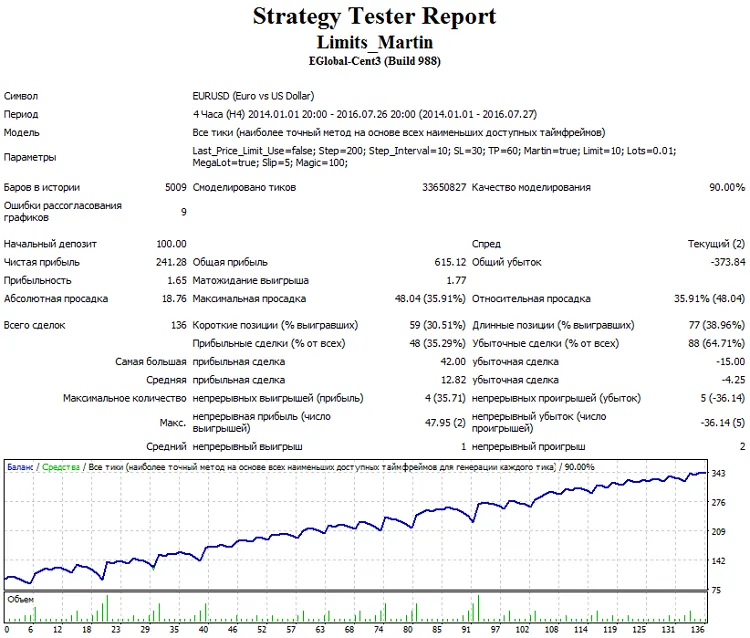
Default Settings: At the default of Step points (200 points by default) from the market price, the EA places pending Buy Limit and Sell Limit orders with a stop loss of SL (30 points by default) and a take profit of TP (60 points by default).
Trailing Orders: If the price moves away from the pending order, the EA will trail these orders with a step of Step_Interval points (default is 10 points).
Order Management: When any pending order is triggered, the opposite one is removed, and no new orders are placed until the existing market order is closed. If the last order was profitable, subsequent limit orders are opened with the initial lot size defined by the Lots parameter. If the last order closed at a loss or a series of losing orders occurred, the EA calculates the lot size for the next orders to ensure that closing the next order at take profit covers the previous losses (it's advisable to set the take profit at least twice the stop loss size).
MegaLot Feature: If MegaLot is enabled and the previous order (or series) closed in loss, the next order will open with a lot size that covers these losses and earns extra based on the profit points taken by the initial lot.
Lot Multiplication Limit: The EA comes with a cap on the number of lot multiplications defined in the Limit parameter. If you hit a series of consecutive losing orders equal to or exceeding the Limit, the lot size for subsequent orders resets to the initial value defined by the Lots parameter until a profitable order closes.
Disable Lot Size Increase: You can prevent lot size increases after losses by setting Martin = false.
Pending Order Placement: The EA allows placing pending orders at the price of the last deleted order (but it’s advisable to keep this setting false).




Comments 0