
The Exp_2pbIdealMA EA is a powerful tool designed for traders looking to capitalize on market trends using Moving Averages. This expert advisor operates on the principle of crossing Moving Averages, adjusting the position size according to the market trend.
Here’s how it works: a signal is generated when a bar closes, indicating a crossover between the fast 2pbIdeal1MA and the slower 2pbIdeal3MA. If the previous trade’s profit points surpass the threshold set in the EA’s input parameters, the EA will scale the volume of the opened position. A breakout of the fast Moving Average signals a buy opportunity, while a breakdown indicates a sell.
All position scaling information is neatly stored in the trade comment as follows: number of scales / price of last deal / volume of last deal.
Setting Up Your EA
To get started, place the compiled files 2pbIdeal1MA.ex5 and 2pbIdeal3MA.ex5 into your <terminal_data_folder>\MQL5\Indicators.
Once compiled, the Exp_2pbIdealMA_ReOpen.ex5 expert file will automatically include the 2pbIdeal1MA.ex5 and 2pbIdeal3MA.ex5 indicators as resources. This means you won’t need to have them in your terminal folder for the EA to function properly, thanks to the code integrated into the EA.
The inclusion of the indicator executable files as resources is done at the global level:
#resource "\\Indicators\\2pbIdeal1MA.ex5"
#resource "\\Indicators\\2pbIdeal3MA.ex5"
After that, the string paths to the indicators are modified within the OnInit() function:
InpInd1_Handle=iCustom(Symbol(),InpInd_Timeframe,"::Indicators\\2pbIdeal1MA.ex5",Period1,Period2,0);
if(InpInd1_Handle==INVALID_HANDLE)
{
Print("Failed to get the 2pbIdeal1MA indicator handle! Error code=",GetLastError(),".");
return(INIT_FAILED);
}
//---- getting handle of the 2pbIdeal3MA indicator
InpInd2_Handle=iCustom(Symbol(),InpInd_Timeframe,"::Indicators\\2pbIdeal3MA.ex5",PeriodX1,PeriodX2,PeriodY1,PeriodY2,PeriodZ1,PeriodZ2,0);
if(InpInd2_Handle==INVALID_HANDLE)
{
Print("Failed to get the 2pbIdeal3MA indicator handle! Error code=",GetLastError(),".");
return(INIT_FAILED);
}
This means that the compiled EA can be used on different trading terminals without needing the indicators present.
Testing Results
The default input parameters for the Expert Advisor were used during testing, without applying Stop Loss or Take Profit. Below are the results from testing conducted on GBPJPY H4 in 2015:
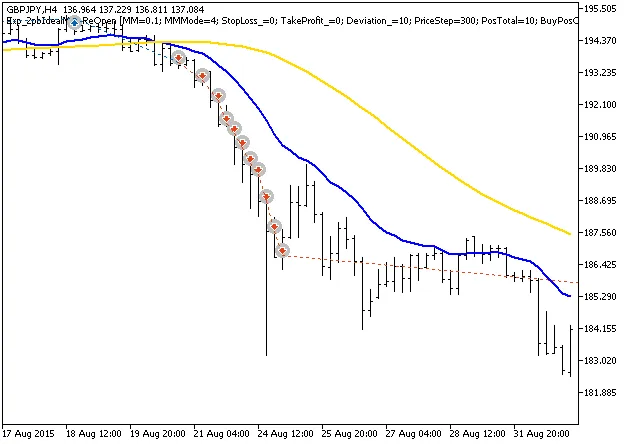
Fig. 1. Examples of deals on the chart
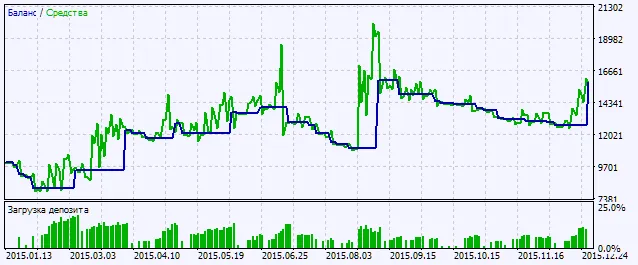
Fig. 2. Chart of testing results




Comments 0