
Hey fellow traders! Today, we're diving into a trading system that leverages the Digital_MACD indicator. If you're looking to enhance your trading game on MetaTrader 5, this might just be the tool for you.
So, how does it work? A trade signal is generated when a bar closes, particularly when the MACD histogram crosses the zero level or when there's a change in the direction of the histogram or signal line. If the histogram breaks through the signal line, that's your green light to go!
One key input parameter to get started is:
input AlgMode Mode=MACDtwist; // Algorithm for market entry
Keep in mind that the Expert Advisor will need the compiled file for the Digital_MACD indicator, which you can place in your terminal data folder under MQL5\Indicators. This is a critical step to ensure everything runs smoothly.
Also, don’t forget about the TradeAlgorithms.mqh library file. It's essential for using Expert Advisors with brokers that offer non-zero spreads, and it allows you to set Stop Loss and Take Profit right when you open a position. If you're interested, you can explore more variants of this library here: TradeAlgorithms.
For our testing, we used the default input parameters of the Expert Advisor. It's worth noting that during these tests, we didn’t utilize Stop Loss or Take Profit settings.
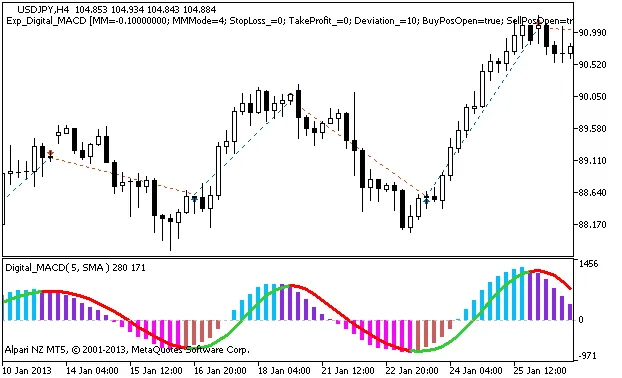
Fig. 1 The instances of history of deals on the chart.
Now, let's take a look at the testing results for 2013, focusing on the USDJPY H4 timeframe:
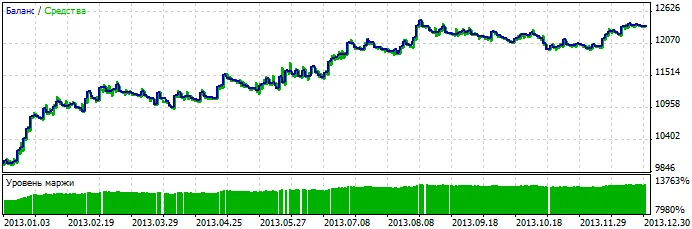
Fig. 2 Testing results




Comments 0