
Welcome to our deep dive into the Exp_QQECloud trading system, a fantastic tool for traders using MetaTrader 5!
This system relies on a trend indicator to make decisions at precise moments: when to open and close positions. Let’s break it down.
Key Decision Points
There are two critical moments to consider:
- Position Opening: Defined by the Exp_QQECloud indicator's color.
- Position Closing: Also predetermined by the system.
These moments hinge on the input parameters of the Expert Advisor:
input Hour StartHour=H08; // Hour of position openinginput Min StartMinute=M00; // Minute of position openinginput HourX StopHour=HX23; // Hour of position closinginput Min StopMinute=M59; // Minute of position closing
Understanding the Indicator Colors
When it’s time to make a trade, check the color of the Exp_QQECloud indicator:
- If it’s red, you’ll be looking at a short position.
- If it’s purple, it’s all about going long!
Make sure to place the Exp_QQECloud.ex5 file in your terminal_data_folder\MQL5\Indicators for it to function correctly.
Broker Compatibility
It’s important to note that the TradeAlgorithms.mqh library is tailored for use with brokers that offer a nonzero spread and allow you to set both Stop Loss and Take Profit when opening a position. You can find alternative versions of this library here.
Testing Insights
The testing below used the default input parameters of the Expert Advisor, with no Stop Loss or Take Profit in play:
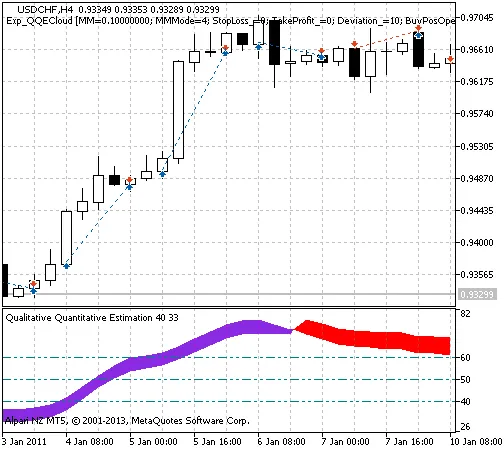
Fig. 1. The instances of history of deals in the chart
Here are the testing results for 2011 on the USDCHF H4:
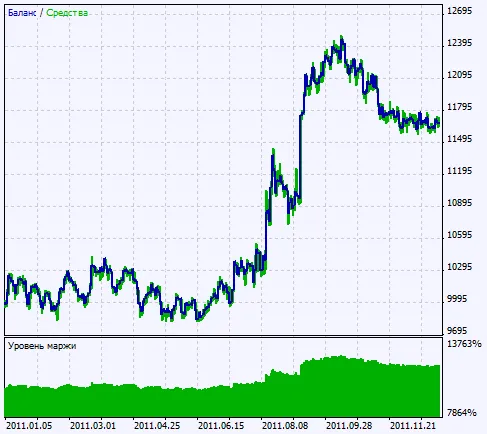
Fig. 2. Chart of testing results




Comments 0