
If you're on the lookout for a reliable trading system, the Exp_StepMA_NRTR might just be your secret weapon. This Expert Advisor (EA) is built on the signals generated by the StepMA_NRTR indicator, and it kicks into gear right at the close of a bar whenever a colored point appears on the indicator.
To get started, make sure you have the compiled indicator file StepMA_NRTR.ex5 saved in your MetaTrader 5 directory at <terminal_data_folder>\MQL5\Indicators. This is crucial for the EA to function properly.
One of the standout features of this EA is its compatibility with brokers that offer a nonzero spread. Plus, thanks to the TradeAlgorithms.mqh library file, you can set your Stop Loss and Take Profit levels right when you open a position. If you're interested, you can explore more library options here: Trade Algorithms.
For the tests shown below, we utilized the default input parameters of the Expert Advisor. Notably, we conducted the tests without applying Stop Loss or Take Profit, allowing us to see how the EA performs under pure market conditions.
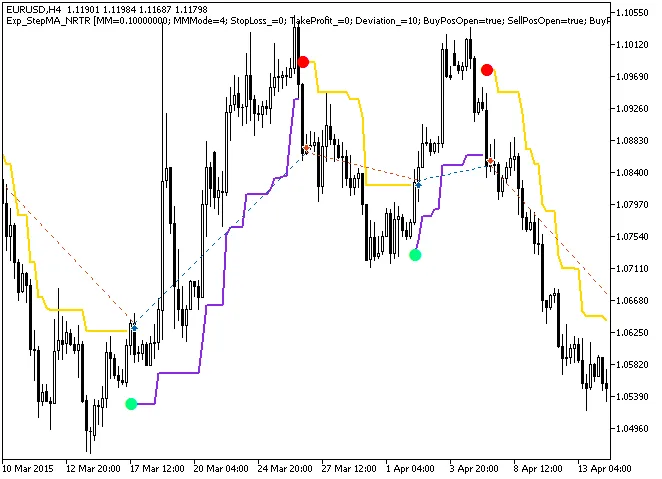
Fig. 1. Examples of trades on the chart
Now, let’s take a look at the testing results for the year 2015 using the EUR/USD on the H4 timeframe:
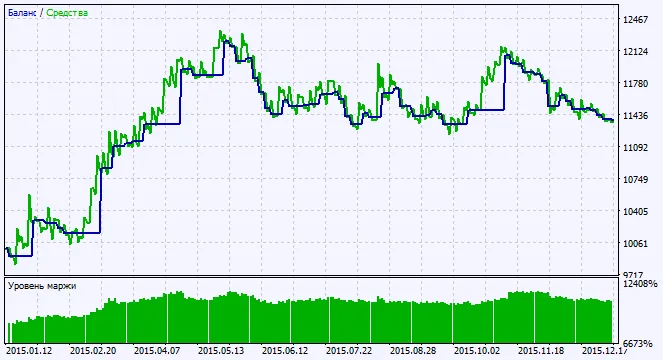
Fig. 2. Charts of testing results




Comments 0