
Hey fellow traders! Today, let's dive into the Exp_Q2MA Expert Advisor, a handy tool designed to make your trading on MetaTrader 5 smoother and more efficient.
The Exp_Q2MA EA operates based on the color changes of the Q2MA indicator. It generates signals when a bar closes and the cloud color of the indicator shifts. What’s great about this EA is its capability to trade against the prevailing trend:
inputbool Invert=false; //Trade against a trend
To get started, make sure to have the compiled Q2MA.ex5 indicator file ready. You’ll need to save it in your <terminal_data_folder>\MQL5\Indicators directory.
Also, don’t forget about the TradeAlgorithms.mqh library file! This is a real game changer since it allows you to use Expert Advisors with brokers that offer a nonzero spread, plus you can set your Stop Loss and Take Profit right when you open a position. If you want to expand your toolkit, check out more variants of the library here: Trade Algorithms.
For the tests we’ve conducted, we used the default input parameters of the EA, and interestingly, we didn’t apply Stop Loss or Take Profit during these tests.
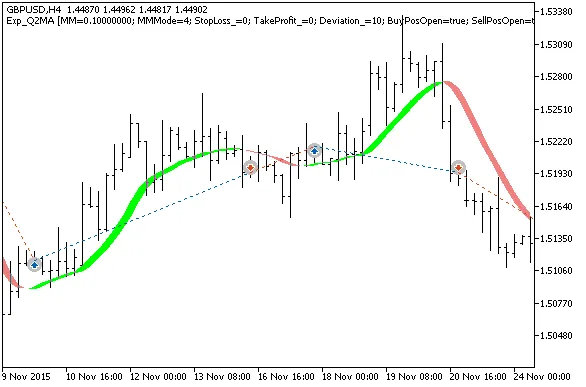
Fig.1. Examples of trades on the chart
Now, let’s take a look at the testing results from 2014, specifically for GBPUSD on the H4 timeframe:
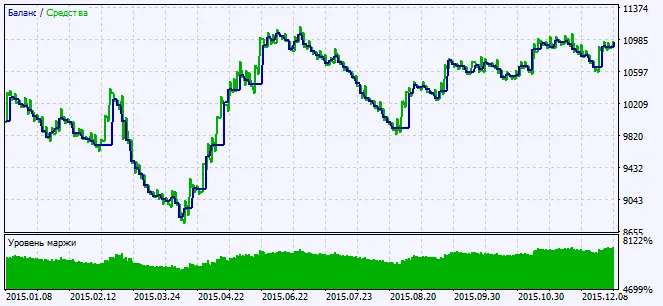
Fig.2. Charts of testing results




Comments 0