
Hey traders! If you’re looking to supercharge your trading experience, you’ll want to check out the revamped Equity Chart Indicator. This upgrade comes from the talented Igor Korepin, who originally brought this tool to life.
So, why the upgrade? Well, the original version had a few hiccups with certain instruments. Some brokers use tickers that come with suffixes or prefixes, and there were some issues with CFD contracts and futures. The new version addresses these problems by incorporating a function that evaluates contract value, allowing it to work seamlessly with any instrument while keeping the original essence of the indicator intact.
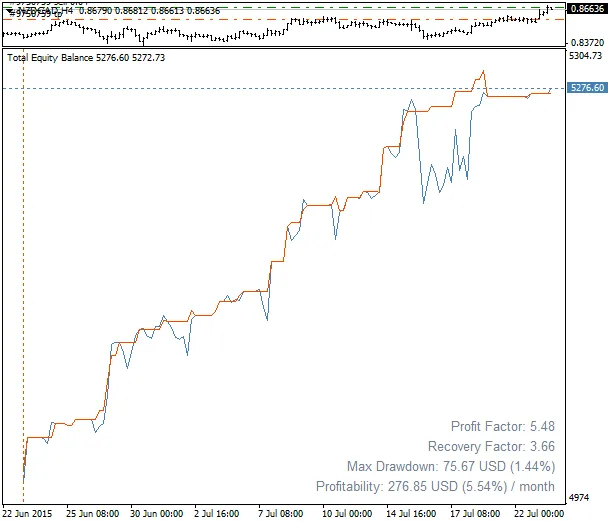
With the default settings, this indicator displays two essential lines: the balance line and the equity line. You can also see the used margin as a histogram and an additional line for free equity throughout your trading history. This feature helps you gauge the aggressiveness of your trading strategy. Plus, it provides trading statistics right on the chart, including yields for the month, year, or your entire trading period, maximum drawdown (both absolute and percentage), profit factor, and recovery factor.
Indicator Parameters:
- Only_Trade — Include only trade operations, excluding balance changes (like deposits, withdrawals, corrections).
- Only_Magics — Consider only orders with specified magic numbers (you can list them with any delimiter).
- Only_Symbols — Focus only on orders with specified tickers (again, listed with any delimiter).
- Only_Comment — Take into account only orders with a specific substring in the comments.
- Only_Current — Focus on orders for the current symbol on the chart.
- Only_Buys — Consider only buy orders.
- Only_Sells — Consider only sell orders.
- Show_Balance — Display the balance line.
- Show_Margin — Show a histogram of the used margin.
- Show_Free — Display the free equity line.
- Show_Zero — Show the zero level line.
- Show_Info — Display statistics like profitability, drawdown, profit factor, and recovery factor.
- Alert_Drawdown — Set a signal level for the drawdown percentage (0 to disable monitoring).
- Max_Drawdown — Maximum allowed drawdown level in percentage.
- Current_Day — Monitor drawdown only for the current day.
- Begin_Monitoring — Set the start time for drawdown monitoring.
- File_Write — Option to save data to a text file (in the MQL4\Files folder, named after the account number).
- Draw_Begin — Set the start time for chart plotting (orders before this time are not considered).
- Report_Period — Profitability calculation period: month/year/total.
- Text_Corner — Choose the corner of the screen to display the statistics.
- FX_prefix — Prefix for currency pairs (needed for some brokers).
- FX_postfix — Suffix for currency pairs (also needed for some brokers).
Operation Features:
When you first run the indicator, you might notice some distortion on the chart. This usually means that the symbol histories aren’t synchronized at that moment. To fix this, try switching timeframes back and forth a few times or forcefully download the history for all symbols by opening their corresponding charts. The good news is that the new version of the indicator auto-updates when switching accounts!
For everything to work smoothly, make sure your trade history in the “History Center” is fully downloaded.




Comments 0