
Hey fellow traders! Today, let’s dive into a trading system that leverages the iDeMarkerSign indicator signals. This system generates a trading signal right at the close of a bar whenever a colored icon from the indicator pops up. It's a straightforward yet effective approach to enhance your trading strategy.
To get started with this Expert Advisor (EA), make sure you have the compiled indicator file, iDeMarkerSign.ex5, placed in the <terminal_data_folder>\MQL5\Indicators directory. This step is crucial for the EA to function properly.
One important feature of this EA is the TradeAlgorithms.mqh library file, which enables you to use EAs with brokers offering nonzero spreads. Plus, you can set your Stop Loss and Take Profit levels right when you open a position. For more options, check out the different versions of the library available here: Trade Algorithms.
In the testing phase, we utilized the default input parameters for this EA. It’s worth noting that neither Stop Loss nor Take Profit was employed during these tests. Below, you can see the results:
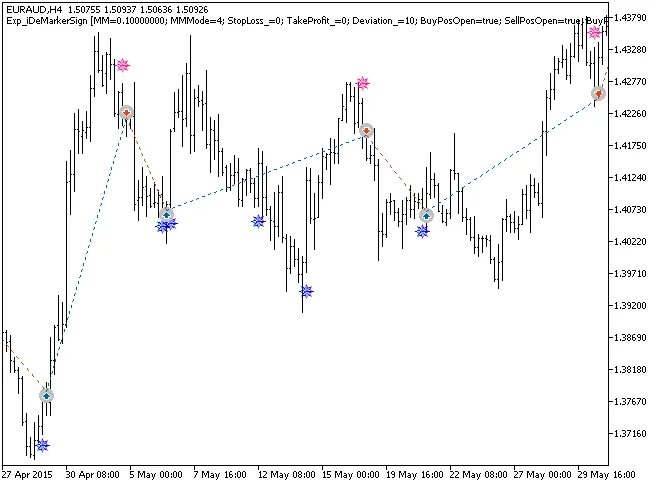
Fig. 1. The instances of history of deals on the chart.
Let’s take a look at the testing results for the year 2015 on the EURAUD H4 timeframe:
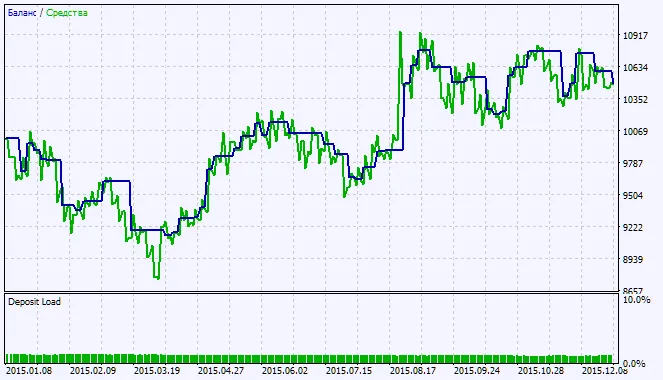
Fig. 2. Testing results chart




Comments 0