
Author of the idea: Iurii Tokman, mq5 code author: barabashkakvn.
Are you ready to take your trading to the next level? OpenTime is an innovative Expert Advisor (EA) designed for MetaTrader 5, allowing you to open and close positions at specified times. You can customize settings for both Buy and Sell positions, giving you flexibility in your trading strategy. Plus, you can set stop loss, take profit, and trailing stops to manage your risk effectively.
Input Parameters
Position Closing Options
- Use Position Closing Time - Toggle this option to enable or disable time-based position closing.
- Closing Hour - Specify the hour for closing your positions.
- Minutes of Position Closing - Set the minutes for when the position will close.
- Trailing - Activate the trailing stop function.
- Trailing Stop (in pips) - Define your trailing stop value.
- Trailing Step (in pips) - Set your trailing step value.
Position Opening Settings
- Opening Hour - The hour you want to open your position.
- Minutes of Position Opening - The minutes for opening the position.
- Duration in Seconds - Time period for position opening.
- Use Sell - Allow the EA to open Sell positions.
- Use Buy - Allow the EA to open Buy positions.
- Volume Transaction - Set the volume of your positions.
- StopLoss (in pips) - Define your Stop Loss level.
- TakeProfit (in pips) - Set your Take Profit level.
- Advisor Options
- MagicNumber - Your unique identifier for the EA.
For best results, it's advisable to optimize the EA in two steps. Start by focusing on the key parameters in the first step:
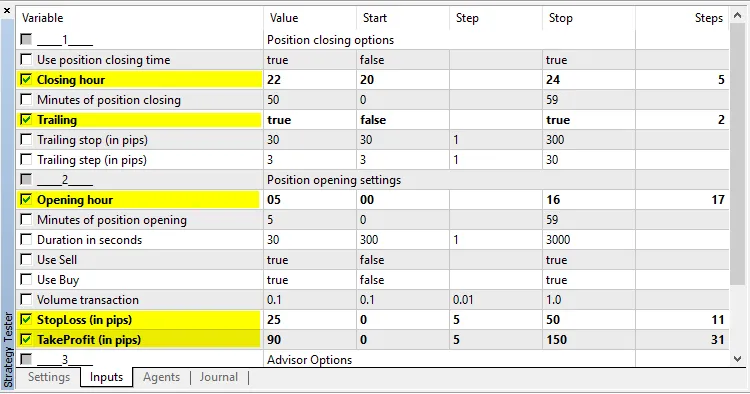
Once you've identified the best configurations, disable the settings from the first step and enable the remaining parameters.
Here’s one of the results using EURUSD on the H1 timeframe:





Comments 0