
Welcome, fellow traders! Today, we're diving into the gpfTCPivotLimit, a fantastic Expert Advisor (EA) specifically designed for MetaTrader 5. This EA has been carefully rewritten from MQL4 and was originally published by the talented George-on-Don. You can check out the original code here.
How It Works
The gpfTCPivotLimit EA operates by opening a buy position when the price intersects with the support level. For this to happen, the current bar must close above that level, while the previous bar should both open above it and either cross it with its shadow or close right at the level. Conversely, a sell position is triggered under opposite conditions.
Stop Loss and Take Profit levels are set based on support and resistance levels, positioned below or above your entry point. If these levels are too close to one another to open a position, the EA will attempt to manage the trade by setting the Stop Loss at the second support/resistance level and the Take Profit at the third.
As the trade progresses, once the nearest support/resistance level is hit, and if the Take Profit is still further away, the EA automatically moves the Stop Loss to the opening price plus the spread. Don't worry, you can disable this function if you prefer!
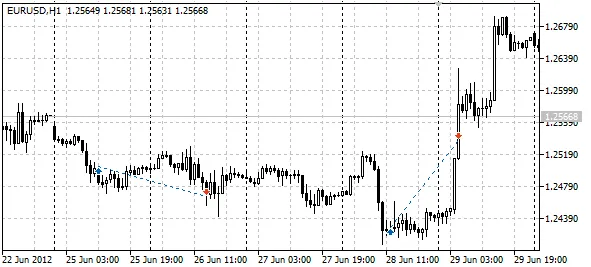
Check out the image below to see how the EA performs in the strategy tester's visual mode:
Parameters
- Lots: This is the order volume; if set to 0, the MaxR parameter will be utilized.
- SndMl: Sends you email notifications whenever the EA opens or closes a position.
- DcF: This is the lot reduction factor in times of loss. A value of 0 means no reduction occurs. The lower the value, the greater the lot reduction. If it can't be reduced, the minimum lot size will be used.
- MaxR: This sets the maximum risk from 0-1 as a share of your free funds, particularly useful when Lots are set to 0.
- TgtProfit: This parameter defines how you utilize the levels (1-5) when opening a buy position:
1 - open at Support1, Stop Loss at Support2, Take Profit at Resist1;
2 - open at Support1, Stop Loss at Support2, Take Profit at Resist2;
3 - open at Support2, Stop Loss at Support3, Take Profit at Resist1;
4 - open at Support2, Stop Loss at Support3, Take Profit at Resist2;
5 - open at Support2, Stop Loss at Support3, Take Profit at Resist3. - isTradeDay: This setting allows for intraday trading only, closing positions at 23:00.
- ModSL: This modifies the Stop Loss once the first target is reached, moving it to the nearest level in the direction of profit from the opening level.
In conclusion, the gpfTCPivotLimit EA offers a robust strategy for traders looking to optimize their MetaTrader 5 experience. Give it a try and see how it can enhance your trading!




Comments 0