
Are you looking to elevate your trading game? Look no further than Ask Bid Ticks, a powerful real-time tick data solution designed specifically for microstructure analysis. This high-precision tick data collector exports tick-by-tick prices directly to a CSV file, giving you full control over filename options, delimiters, and timestamps. Plus, it syncs with your local computer time, ensuring you capture the exact arrival time of each tick with exceptional accuracy.
Settings:
To get started, you'll need to enable DLL imports, as the program utilizes a Windows system file called kernel32.dll to provide millisecond timestamps. You can easily set this up in the Dependencies tab located in the Properties window (check out the image below).
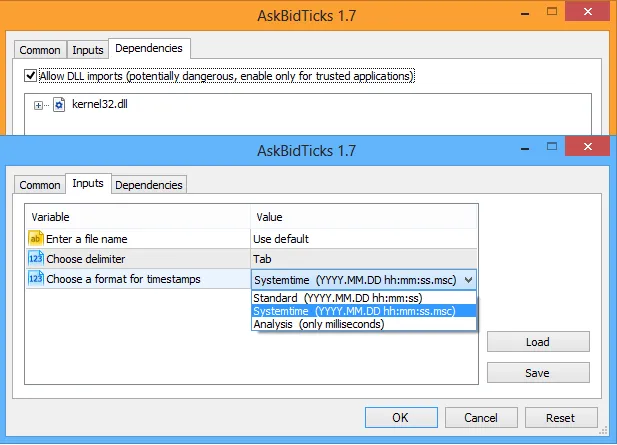
When it comes to data output, you have the flexibility to choose your delimiter for the data columns, which include date time, symbol name, and ask/bid prices. You can also select your preferred timestamp format:
- Standard: This outputs a typical timestamp like
2012.11.13 15:41:23. - Systemtime: For high precision, this mode uses system time and outputs something like
2012.11.13 15:41:23.692. - Analysis: This option shows the total number of milliseconds elapsed since the first tick, simplifying high-frequency data analysis with other tools.
If you want to customize the output file name, simply delete the text Use default from the first parameter and enter your desired filename.
Output File:
Your output file will be stored in the terminal_data_directory. To quickly access this directory, use the file menu in your MetaTrader 5 client terminal. At the start of the program, you’ll also find the complete file path displayed in the ToolBox under the Experts tab:

Here's a sneak peek at a tab-delimited output CSV sample featuring millisecond timestamps:
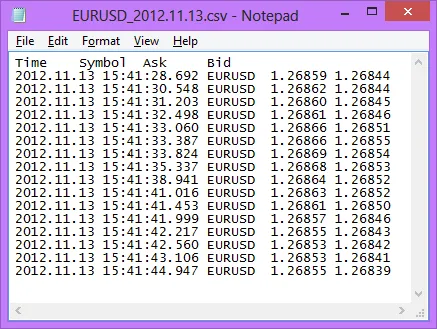
Keep in mind that there may be some missing ticks. While the chances of this happening are minimal, it can depend on several factors:
- Economic activity during the period.
- The performance of the hardware running the code: Missing ticks often occur due to the no-queue policy in the NewTick event handling. To maximize precision in timestamping new tick arrivals, it’s best to use this software on fast hardware.




Comments 0