
Welcome to our deep dive into the Exp_VininI_Trend_LRMA trading system, a robust tool designed for MetaTrader 5 users looking to capitalize on trend changes. This system relies on the VininI_Trend_LRMA indicator to identify when trends are shifting.
Signals are generated based on your chosen algorithm for signal formation, which is defined by the following input parameter:
input AlgMode Mode=BREAKDOWN; //Algorithm for market entry
You have two options for this algorithm:
- Breakthrough of the UpLevel and DnLevel levels of the indicator;
- Change in the direction of the indicator.
To avoid false signals during flat market conditions, you should integrate the ChangeOfVolatility volatility indicator. This indicator helps assess whether there’s sufficient trend strength to warrant opening a position. The deals are filtered through the input parameter of this indicator:
inputuint MaxTrendLevel=60; // Minimum trend level for making a deal (range: 0-100)
It's important to note that deal filtering occurs only during entry; exits are made without additional filtering.
To set up, place the compiled files VininI_Trend_LRMA.ex5 and ChangeOfVolatility.ex5 in your terminal_data_folder\MQL5\Indicators directory.
For those interested, there’s also the Exp_VininI_Trend_LRMA_ Expert Advisor, which operates without the volatility indicator!
The testing results shared below utilized the default input parameters for the Expert Advisor, with no Stop Loss or Take Profit settings in play.
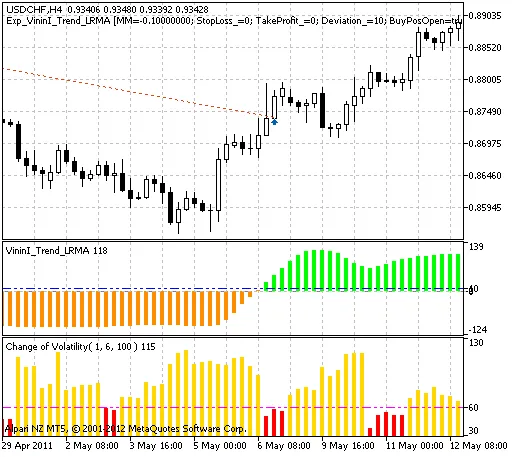
Fig. 1. Trade history instances on the chart.
Now, let’s take a look at the testing results for 2011 on the USDCHF H4:
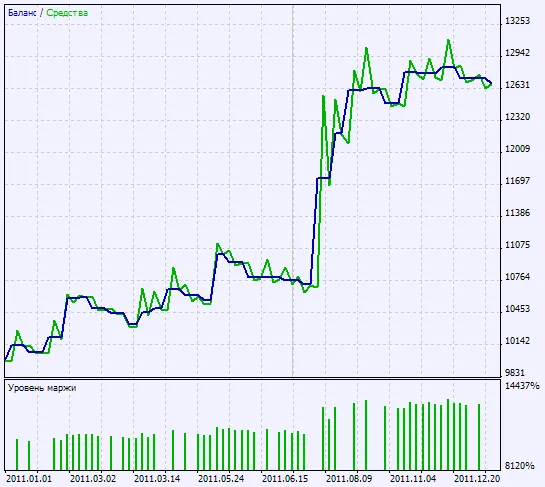
Fig. 2. Testing results chart.




Comments 0