
Hey there, fellow traders! If you're looking to refine your trading strategy, you might want to check out this nifty Expert Advisor (EA) that focuses on opening only long or short positions. This system is built on the CExpert class and is perfect for those who like a bit more control over their trades.
You'll find two handy files included:
- LongShortExpertModified.mqh: This file tweaks the standard CExpert class by modifying the
CheckOpen()andCheckReverse()methods, allowing you to specify which types of orders you want to open. - LongShortExpertMACD.mq5: This EA is a simple yet effective modification of the embedded ExpertMACD.mq5 class. It integrates the modified expert to ensure that only the specified order types are allowed, demonstrating how to use the expert effectively.
Diving into LongShortExpertModified
This class enhances the default CExpert class behavior, allowing you to control the type of orders based on an enum value:
enum ENUM_AVAILABLE_POSITIONS
  {
   LONG_POSITION,
   SHORT_POSITION,
   BOTH_POSITION
  };
This enum serves as an input parameter for your final EA, indicating which types of trades are permissible. It only allows the desired orders to be executed and manages order reversals when both position types are permitted (using the BOTH_POSITION enum).
To achieve this, the CheckOpen() and CheckReverse() methods have been rewritten:
class CLongShortExpertModified : public CExpert
  {
protected:
   ENUM_AVAILABLE_POSITIONS m_positions;
public:
                     CLongShortExpertModified(void);
                    ~CLongShortExpertModified(void);
   virtualbool      CheckOpen(void);
   virtualbool      CheckReverse(void);
   void SetAvailablePositions(ENUM_AVAILABLE_POSITIONS newValue){m_positions=newValue;};
  };
The CheckOpen() method is designed to only check for long or short positions based on the m_positions value:
bool CLongShortExpertModified::CheckOpen()
  {
   switch(m_positions)
     {
      case LONG_POSITION:
         return CheckOpenLong();         // check only new long positions
      case SHORT_POSITION:
         return CheckOpenShort();        // check only new short positions
      default:
         return CExpert::CheckOpen();    // default behavior
     }
  }
Furthermore, CheckReverse() is modified to check for position reversals only when both position types are allowed:
bool CLongShortExpertModified::CheckReverse()
  {
   switch(m_positions)
     {
      case LONG_POSITION:
      case SHORT_POSITION:
         returnfalse;                    // no reversal is allowed
      default:
         return CExpert::CheckReverse(); // default behavior
     }
  }
Getting Started with LongShortExpertMACD
This class shows a practical example of using the previous class, based on the default ExpertMACD EA included in MQL5 distribution.
First things first, you need to include the specific Expert class and add the required input parameter. This ensures that your external expert is linked to the subclass rather than the default CExpert:
#include <Expert\LongShortExpertModified.mqh>
// [...]input ENUM_AVAILABLE_POSITIONS Inp_Allowed_Positions=BOTH_POSITION; // short / long / both positions allowed// [...]
CLongShortExpertModified ExtExpert;  // specific designed CExpert Subclass
Once you've initialized the expert, set the parameter according to the input value:
if(!ExtExpert.Init(Symbol(),Period(),Expert_EveryTick,Expert_MagicNumber))
     {
      //--- failed
      printf(__FUNCTION__+": error initializing expert");
      ExtExpert.Deinit();
      return(-1);
     }

   // Specific parameter controlling which positions are allowed
   ExtExpert.SetAvailablePositions(Inp_Allowed_Positions);
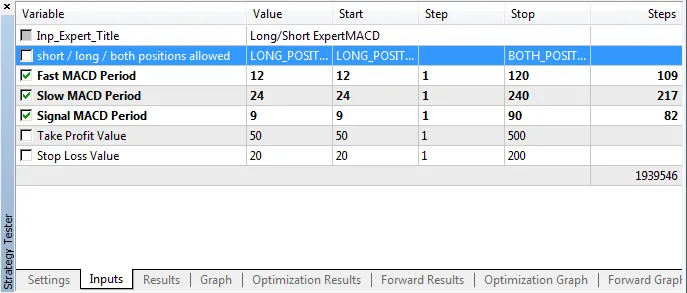
No more changes are needed! Check out the configuration parameters for the expert below:




Comments 0