
Hey traders! Today, let's dive into a powerful trading system that leverages the UltraMFI indicator. This system not only signals trades but also smartly adjusts the volume of your upcoming trades based on past performance. Intrigued? Let's break it down!
How the System Works
Trading signals are generated when a bar closes, especially if there's a trend shift, indicated by a change in the cloud. Here’s how you can manage your trading volumes effectively:
Input Variables for Volume Management
inputuint    BuyTotalMMTriger=5; // Last 5 Buy trades for stop loss calculation
inputuint    BuyLossMMTriger=3;  // Number of losing Buy trades to adjust MM
inputuint    SellTotalMMTriger=5;// Last 5 Sell trades for stop loss calculation
inputuint    SellLossMMTriger=3; // Number of losing Sell trades to adjust MM
inputdouble  SmallMM_=0.01;      // Deal share in case of a loss
inputdouble  MM=0.1             // Deal share during normal trading
input MarginMode MMMode=LOT;      // Method for determining lot values
With these inputs, if you find that three out of your last five trades were losers in one direction, the EA will open the next trade in the same direction with a volume of 0.01 lots. If not, the position volume bumps up to 0.1 lots.
Getting Started with the UltraMFI EA
To ensure your EA runs smoothly, make sure you have the compiled UltraMFI.ex5 indicator file in your <terminal_data_directory>\MQL5\Indicators folder.
For testing purposes, we used the default input parameters without stops, and here's what we found:
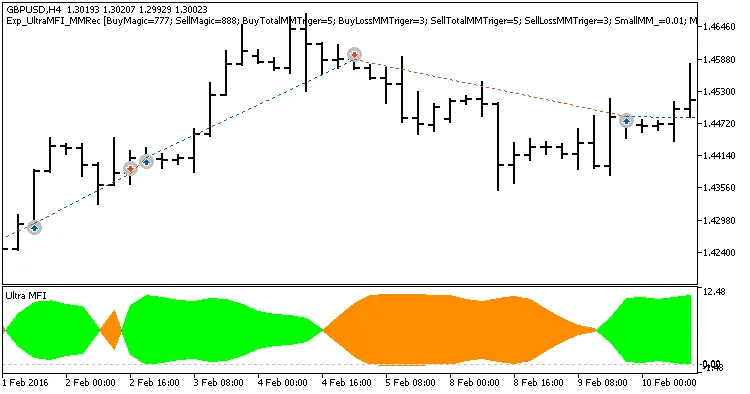
Fig. 1. Example trades on the chart
Here are the testing results for GBPUSD on the H4 timeframe over the year 2017:
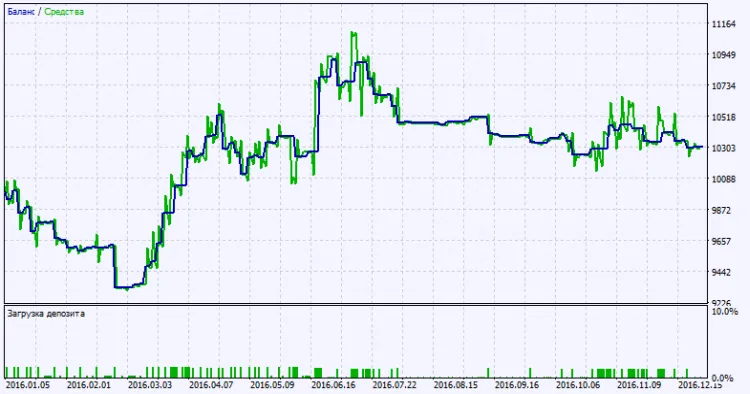
Fig. 2. Test results chart




Comments 0