
Welcome, fellow traders! Today, I'm excited to share with you a powerful tool that can elevate your trading game—a News EA template designed specifically for MetaTrader 4. This template harnesses the power of two reliable news sources: Investing.com and Dailyfx.com. Plus, the best part? It doesn't rely on any DLL files!
This Expert Advisor is smart enough to differentiate between weak, medium, and strong news events, including the all-important Non-farm Payrolls. You can customize the time indentations for each news type, allowing you to receive timely signals for both upcoming and past news events.
What’s more, you have the flexibility to invert the template’s functionality. This means you can choose to trade solely on news lines or right before the Non-farm Payrolls release. If there’s a flurry of news, the EA will prioritize the strongest ones, so you know exactly when to take action.
This template is more than just a setup; it’s a starting point for your trading endeavors. It comes with a basic trading function, ManageTrade(), which you can tweak and personalize to fit your trading style. The logic is straightforward: if news is detected based on your settings, trading will pause during the specified time frame.
Here’s a quick look at how the trading function works:
if(IsTradeAllowed() && trade) {// No news and trading is allowed
      ManageTrade(); // Your trading functions go here
}
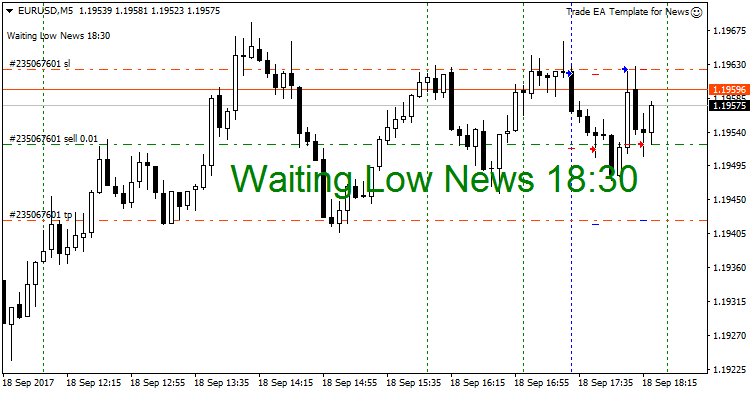
Settings:
- SourceNews – Select your preferred news source.
- LowNews – Enable weak news.
- LowIndentBefore – Time before a weak news release.
- LowIndentAfter - Time after a weak news release.
- MidleNews - Enable medium news.
- MidleIndentBefore - Time before a medium news release.
- MidleIndentAfter - Time after a medium news release.
- HighNews - Enable strong news.
- HighIndentBefore - Time before a strong news release.
- HighIndentAfter - Time after a strong news release.
- NFPNews - Enable Non-farm Payrolls news.
- NFPIndentBefore - Time before Non-farm Payrolls news release.
- NFPIndentAfter - Time after Non-farm Payrolls news release.
- DrawNewsLines - Activate to display news lines on your chart.
- LowColor – Color for weak news.
- MidleColor - Color for medium news.
- HighColor - Color for strong news.
- LineWidth – Specify the line width.
- LineStyle - Choose the line style.
- OnlySymbolNews - Set to "true" to show news only for the selected symbol, or "false" for all.
- Your Time Zone, GMT (for news) - Set your time zone (GMT).
Just a quick reminder: this template is designed to help you build your own Expert Advisor. If you’re unsure about how to add the necessary functions, don’t hesitate to reach out—I'm here to help!




Comments 0