
Are you ready to elevate your trading game? The wlxBW5Zone trading system is designed to leverage the signals from the wlxBW5Zone indicator to help you make informed trading decisions. Each time a color icon appears at the close of a bar, it indicates a potential trading opportunity.
To get started with this Expert Advisor (EA), you'll need the compiled indicator file wlxBW5Zone.ex5. Make sure to place it in the <terminal_data_folder>\MQL5\Indicators directory to ensure smooth operation.
A key feature of this EA is its compatibility with brokers that offer a non-zero spread. It also allows you to set Stop Loss and Take Profit simultaneously when opening a position. If you're looking for more options, you can explore additional variants of the Trade Algorithms library.
During testing, we utilized the default input parameters for the Expert Advisor, and it's worth noting that neither Stop Loss nor Take Profit was used in the tests conducted.
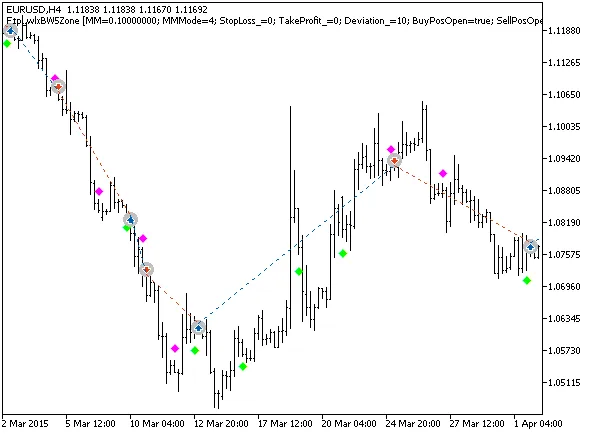
Fig. 1. The instances of history of deals on the chart.
Now, let’s dive into the testing results for 2015 using the EURUSD currency pair on the H4 timeframe:
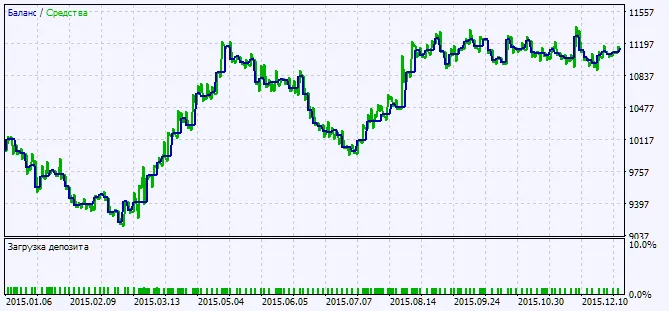
Fig. 2. Testing results chart




Comments 0