
Understanding the Dots Indicator for MetaTrader 5
The Dots Indicator is a fantastic tool for traders looking to gauge market trends. Originally developed by TrendLaboratory back in 2006, this indicator does a great job of visually representing the current trend direction right on your main chart. You’ll spot blue dots signaling a bullish trend and red dots indicating a bearish one. While it doesn't rely on standard MetaTrader indicators, it does make a call to iMA() (moving average) to derive price values based on your selected input type—like Close, Open, High, Low, and so on. The calculations hinge on the cosine of the price change angle, giving you a unique perspective on market movements. Plus, you can tweak several input parameters to suit your trading style. Best of all, it’s available for both MT4 and MT5 platforms.
Input Parameters
- Length (default = 10) — This defines the period for the indicator. A higher value means more lag but fewer false signals, which can help you avoid unnecessary trades.
- Applied Price (default = PRICE_CLOSE) — Choose the price type you want to use in your calculations.
- Filter (default = 0) — This handy parameter helps filter out spikes without adding lag, giving you cleaner signals.
- Deviation (default = 0) — Use this to shift the indicator display vertically, adjusting its placement on your chart.
- Shift (default = 0) — This allows you to shift the indicator display horizontally, giving you more control over its positioning.
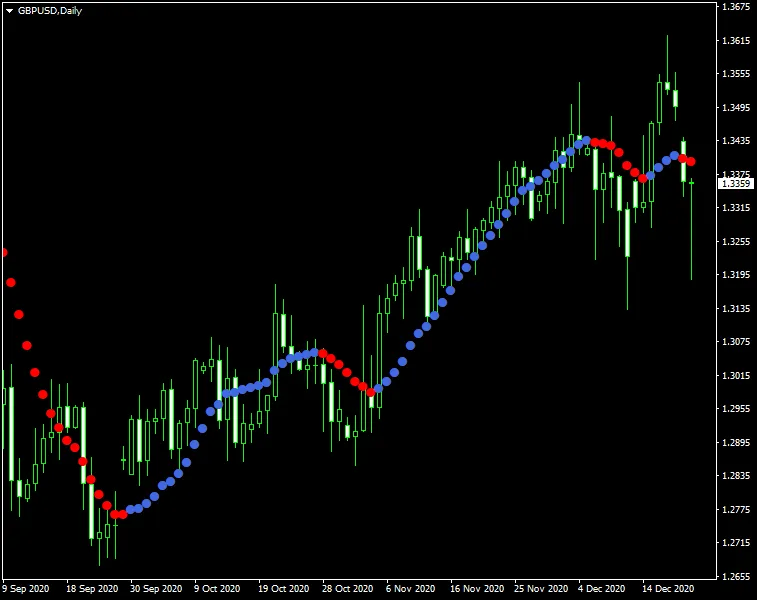
For the best results, consider waiting for two dots of the same color before jumping into a trade aligned with the trend. That being said, there are times when this approach may not work as expected. To improve your chances, you might want to use a single dot signal while setting the Filter parameter to around three times the spread of the currency pair in question. This little tweak could give you a better edge!




Comments 0