
If you're looking to enhance your trading strategy, the Breakout Indicator for MetaTrader 5 is a game-changer. This handy tool displays High and Low levels over a specific timeframe, which you can customize down to the hour and minute.
The indicator creates two distinct zones on your chart: the "period" zone and the "area" zone. While the price is within the period zone, the High and Low levels are recalibrated, helping you spot potential breakout opportunities.
Here’s what you can set up:
- The starting hour and minute of the "period" zone
- The ending hour and minute of the "period" zone
- The ending hour and minute of the "area" zone, which kicks off right after the "period" zone wraps up
The Breakout Indicator features five input parameters:
- "Period" Hour Begin - Set the hour when the period zone starts
- "Period" Minutes Begin - Set the minute when the period zone starts
- "Period" Hour End - Set the hour when the period zone ends
- "Period" Minutes End - Set the minute when the period zone ends
- "Area" Hour End - Set the hour when the area zone ends
- "Area" Minutes End - Set the minute when the area zone ends
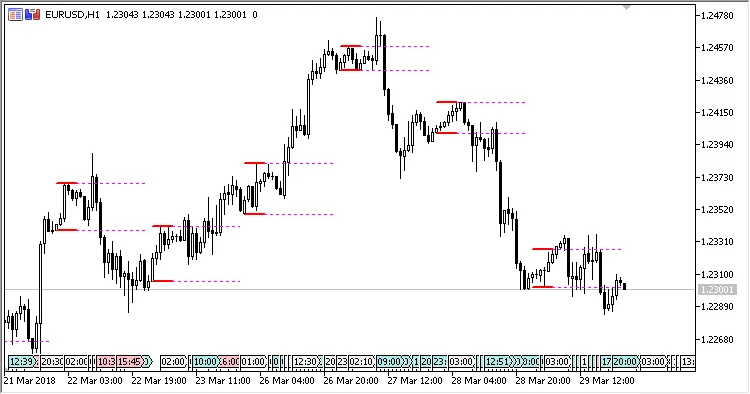
Fig.1. "Period" from 00:00 to 05:00, "Area" to 23:00 on the H1 chart
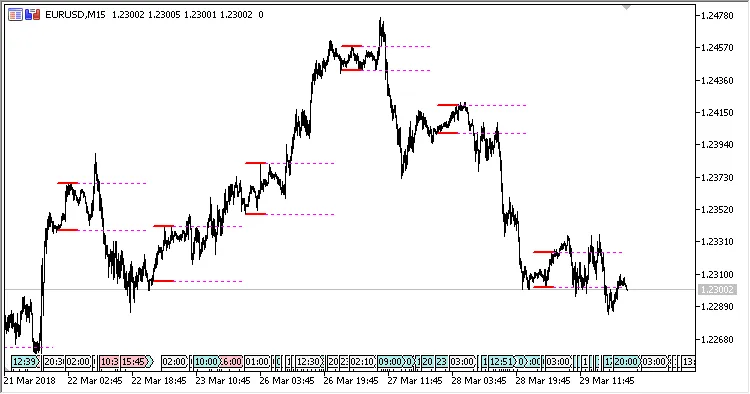
Fig.2. "Period" from 00:00 to 05:00, "Area" to 23:00 on the M15 chart




Comments 0