
Real Author:
Unknown.
The Ilan 1.6 Dynamic HT algorithm is built on a straightforward concept: price averaging with a gradual increase in the volume of each trade.
For instance, if the price dips after you open your first long position and goes beyond a certain point, the system will open a new long position with a larger volume. This strategy keeps the average entry price of Ilan Dynamic close to the current market price. All you need to do then is wait for a small price retracement and close all open positions with a profit using the TakeProfit feature. Here’s a snapshot from the MetaTrader 5 Strategy Tester illustrating the entry points executed by Ilan 1.6 Dynamic:
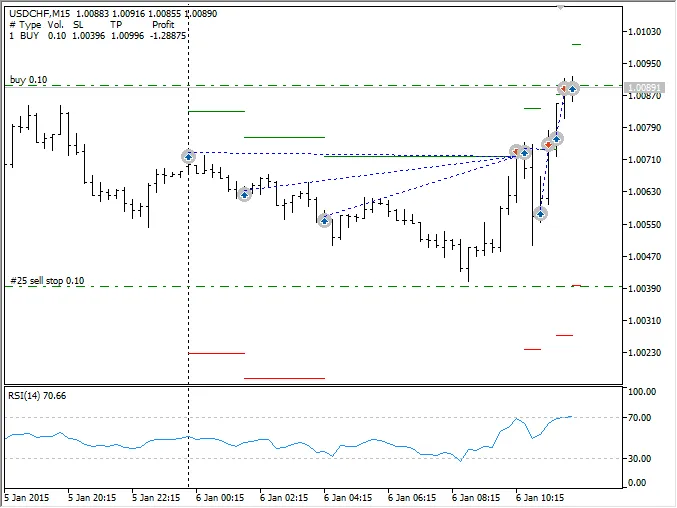
As shown, even though the price moved against three Buy positions, a small pullback allowed all three positions to close profitably. The green horizontal lines indicate the TakeProfit levels, while the red lines show the StopLoss levels.
This Expert Advisor dynamically calculates price averaging levels based on the price range between recent highs and lows, hence the term "Dynamic" in its name.
Besides TakeProfit, Ilan 1.6 Dynamic also supports classic StopLoss settings, trailing stops, time-based exits, CCI indicator exits, and exits based on a specified Equity level across all trades.
Test Results
The performance of Ilan 1.6 Dynamic can vary significantly based on the chosen timeframe, testing period, instrument, broker, and initial conditions. Therefore, meticulous selection of parameters and trading markets is essential for optimal results. However, even with default settings, you can achieve consistent results, as illustrated in the equity and balance charts below:
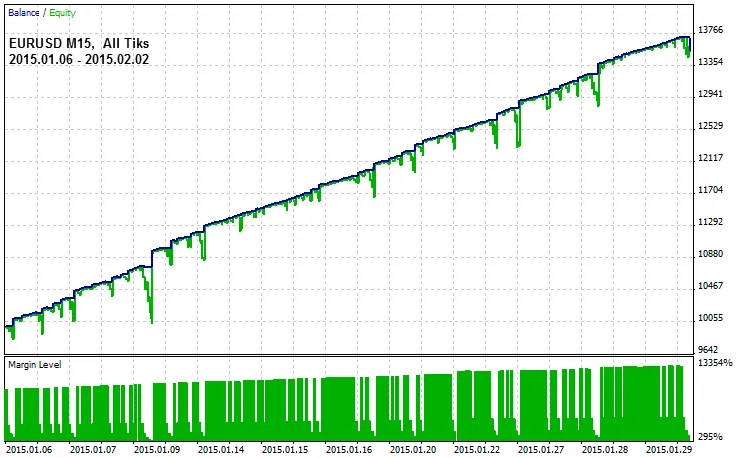
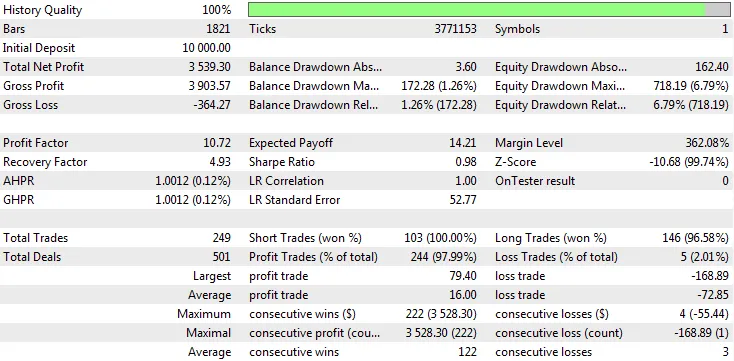
Warning: The floating profit/loss or Equity of Ilan 1.6 Dynamic can differ greatly from its balance as depicted in the charts. If the price moves without retracements, the Equity may drop, potentially leading to a Margin Call and jeopardizing your deposit. It’s advisable to use Ilan 1.6 Dynamic primarily during flat market conditions and to use the lot exponent with caution!
Inputs and Parameters
Ilan 1.6 Dynamic comes optimally configured by default, with most parameters inactive. However, you can customize the settings to suit your trading style. Below is a table for configuring parameters:
| Parameter Name | Value default | Description |
|---|---|---|
| Basic Parameters | ||
| LotExponent | 1.4 | Multiplier for the lot size when opening subsequent positions. For example, if LotExponent = 1.4 and Lots = 0.1, the first position will be 0.1, the second averaging position will be 0.2 (0.1 * 1.4^2), and so on. Adjust this parameter cautiously, with values typically ranging from 1.0 (very conservative) to 2.0 (highly aggressive). |
| MaxTrades | 10 | Maximum number of positions that can be opened in one direction. Once this limit is reached, no new positions will be opened until existing ones are closed based on specific exit conditions. |
| DynamicPips | true | Set to true to use a dynamic price range. |
| DefaultPips | 120 | Default level of the price channel in pips. |
| Glubina | 24 | Determines how many bars are used to calculate the price range between High and Low. |
| DEL | 3 | Ratio used to define the next Buy or Sell level based on the price range. |
| Lots | 0.1 | Initial lot size for the first trade. |
| lotdecimal | 1 | Number of decimal places for lot calculations. 0 - normal lot (1.0), 1 - mini lot (0.1), 2 - micro lot (0.01). |
| TakeProfit | 100 | Take Profit level in points from the current price for closing all open positions. |
| slippage | 30 | Maximum allowable slippage in points. |
| MagicNumber | 2222 | Unique identifier for the Expert Advisor. |
| Market Entry Signal Parameters | ||
| RsiPeriod | 14 | Period for the RSI indicator. |
| RsiMinimum | 30.0 | No Buy trades will be executed if RSI is below this level. |
| RsiMaximum | 70.0 | No Sell trades will be executed if RSI is above this level. |
| Classic StopLoss Configuration | ||
| UseStopLoss | false | By default, StopLoss is not used, but you can enable it by setting this variable to true. |
| StopLoss | 500.0 | StopLoss level in points (default is set for 5-digit quotes). |
| Equity Stop Configuration | ||
| UseEquityStop | false | Set to true to close positions if total loss exceeds a certain percentage of max profit. |
| EquityPercent | 1.0 | Percentage of profits that triggers the Equity-stop for all positions. |
| TotalEquityRisk | 20.0 | Percentage loss of max equity that will trigger exit of all positions. |
| Trailing Stop Configuration | ||
| UseTrailingStop | false | By default, Trailing Stop is not used, enable it to activate. |
| TrailStart | 100.0 | Weighted average profit level in points to activate trailing stop. |
| TrailStop | 100.0 | Distance in points between current price and StopLoss for trailing. |
| CCI-Based Stop Configuration | ||
| UseCCIStop | false | CCI-based stop is not used by default but can be enabled. |
| CCIPeriod | 55 | Period for the CCI. |
| CCILevel | 500 | All short positions are closed if CCI exceeds this level. Long positions close if CCI falls below -500. |
| Time-Based Exit Configuration | ||
| UseCloseByTime | false | Time-based exit is not used by default but can be enabled. |
| MaxTradeOpenHours | 48 | Number of hours since the first position opened after which all positions will close (only counting trading hours). |
Testing Modes: Optimal Instruments and Timeframes
Ilan 1.6 Dynamic is designed to capitalize on short-term price movements. The optimal timeframe is a 15-minute chart (M15), using default settings for 5-digit quotes. The EA supports the following testing modes:
- Every Tick: Ideal for using trailing stops and ensuring accurate exits via TakeProfit, CCI Stop, and EquityStop.
- 1 Minute OHLC: A balance between testing speed and signal accuracy.
- Open Prices Only: The fastest mode, where TakeProfit triggers at the bar opening. Though this method is quicker, it often yields better results than testing in the "Every Tick" mode.
The Ilan 1.6 Dynamic algorithm has been thoroughly tested in both normal and Random Delay modes.
Recommended Currency Pairs
It’s best to deploy Ilan 1.6 Dynamic on currency pairs that experience extended flat (non-trending) periods. Recommended pairs include EURUSD, USDJPY, GBPUSD, USDCHF, EURCHF, and other major currencies. For optimal performance, if you're trading 4-digit pairs, reduce the following parameters by a factor of ten:
- DefaultPips - 12;
- TakeProfit - 10;
- Slippage - 3;
- StopLoss - 50.
Compiling the EA and Getting it Up and Running (Important!)
Ilan 1.6 Dynamic employs a grid of orders and manages individual positions, necessitating special virtualization to work effectively within the MetaTrader 5 environment, similar to MetaTrader 4. This is achieved through calls to the HedgeTerminalAPI library functions. For guidance, read the article "Bi-Directional Trading and Hedging of Positions in MetaTrader 5 Using the HedgeTerminal API, Part 1" to understand how to utilize the library. To modify the EA's trading logic, familiarize yourself with the EA's code through this guide.
Initially, download the HedgeTerminalAPI library to your computer. Then, copy the necessary software modules used by the Expert Advisor (attached here). Here’s a breakdown of these modules:
- ilan_1.6_dynamic_ht.mq5 - The core module containing the EA's trading logic. The "HT" tag indicates that the Expert Advisor requires the HedgeTerminalAPI library. This file should be saved in terminal_data_folder\MQL5\Experts\; the other modules go in terminal_data_folder\MQL5\Include\.
- prototypes.mqh - Contains prototypes needed for library interaction.
- drawhedgeposition.mqh - Visualizes the EA's trades similarly to MetaTrader 4. Bi-directional positions open parallel to each other rather than sequentially as in MetaTrader 5.
- environment.mqh - This module gathers essential trading information for the EA, helping to track the number of positions and their profit/loss, among other details.
- testertable.mqh - Displays a simple table of all open positions of the Expert Advisor in the strategy tester. For real-time position display, use the HedgeTerminal panel.
- indicators.mqh - Provides a straightforward interface for accessing indicator data.
- tradestate.mqh - Helps manage the EA's trading state, ensuring that any executed order is accurately reflected in the order history.
Visualizing the EA's Operation and Manual Control
Ilan 1.6 Dynamic manages multiple unidirectional positions simultaneously, displaying them in MetaTrader 5 as one net position. To easily manage the EA's positions and monitor its trading state, install the demo panel HedgeTerminal. After launching it, the panel will display the Expert Advisor's positions as follows:
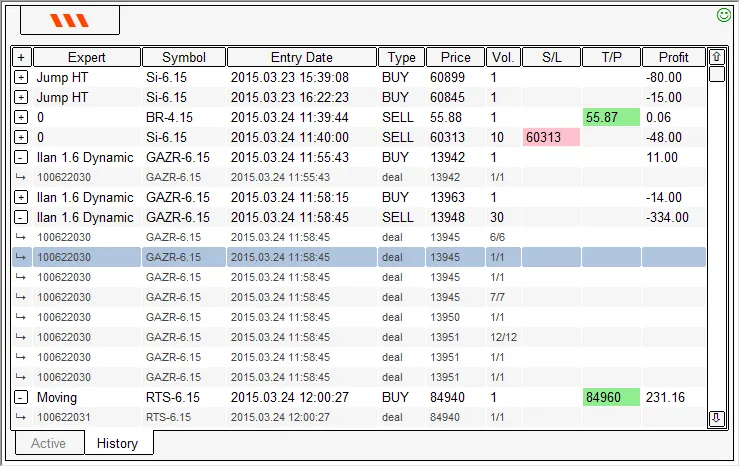
For further details, check out the article "Bi-Directional Trading and Hedging of Positions in MetaTrader 5 Using the HedgeTerminal API, Part 1."




Comments 0