
Author of the strategy: Gabriel, Code Contributor: barabashkakvn.
This trading system leverages the iMACD (MACD) indicators to identify movement in the EUR/USD currency pair.
How to Use This MACD Strategy
To open a position, we check specific conditions for the MACD signals:
void OpenBuyOrSell()
{
double mac1, mac2, mac3, mac4, mac5, mac6, mac7, mac8;
mac1 = iMACDGet(MAIN_LINE, 0);
mac2 = iMACDGet(MAIN_LINE, 1);
mac3 = iMACDGet(MAIN_LINE, 2);
mac4 = iMACDGet(MAIN_LINE, 3);
mac5 = iMACDGet(SIGNAL_LINE, 0);
mac6 = iMACDGet(SIGNAL_LINE, 1);
mac7 = iMACDGet(SIGNAL_LINE, 2);
mac8 = iMACDGet(SIGNAL_LINE, 3);
//--- Check for long position (BUY) possibility
if(mac8 > mac7 && mac7 > mac6 && mac6 < mac5 && mac4 > mac3 && mac3 < mac2 && mac2 < mac1 && mac2 < -0.00020 && mac4 < 0 && mac1 >0.00020)
{
if(!RefreshRates())
return;
double volume = LotsOptimized();
if(volume == 0)
return;
m_trade.Buy(volume, Symbol(), m_symbol.Bid(), 0, 0, "Expert MACD");
return;
}
//--- Check for short position (SELL) possibility
if(mac8 < mac7 && mac7 < mac6 && mac6 > mac5 && mac4 < mac3 && mac3 > mac2 && mac2 > mac1 && mac2 > 0.00020 && mac4 > 0 && mac1 < -0.00035)
{
if(!RefreshRates())
return;
double volume = LotsOptimized();
if(volume == 0)
return;
m_trade.Sell(volume, Symbol(), m_symbol.Ask(), 0, 0, "Expert MACD");
return;
}
}
{
double mac1, mac2, mac3, mac4, mac5, mac6, mac7, mac8;
mac1 = iMACDGet(MAIN_LINE, 0);
mac2 = iMACDGet(MAIN_LINE, 1);
mac3 = iMACDGet(MAIN_LINE, 2);
mac4 = iMACDGet(MAIN_LINE, 3);
mac5 = iMACDGet(SIGNAL_LINE, 0);
mac6 = iMACDGet(SIGNAL_LINE, 1);
mac7 = iMACDGet(SIGNAL_LINE, 2);
mac8 = iMACDGet(SIGNAL_LINE, 3);
//--- Check for long position (BUY) possibility
if(mac8 > mac7 && mac7 > mac6 && mac6 < mac5 && mac4 > mac3 && mac3 < mac2 && mac2 < mac1 && mac2 < -0.00020 && mac4 < 0 && mac1 >0.00020)
{
if(!RefreshRates())
return;
double volume = LotsOptimized();
if(volume == 0)
return;
m_trade.Buy(volume, Symbol(), m_symbol.Bid(), 0, 0, "Expert MACD");
return;
}
//--- Check for short position (SELL) possibility
if(mac8 < mac7 && mac7 < mac6 && mac6 > mac5 && mac4 < mac3 && mac3 > mac2 && mac2 > mac1 && mac2 > 0.00020 && mac4 > 0 && mac1 < -0.00035)
{
if(!RefreshRates())
return;
double volume = LotsOptimized();
if(volume == 0)
return;
m_trade.Sell(volume, Symbol(), m_symbol.Ask(), 0, 0, "Expert MACD");
return;
}
}
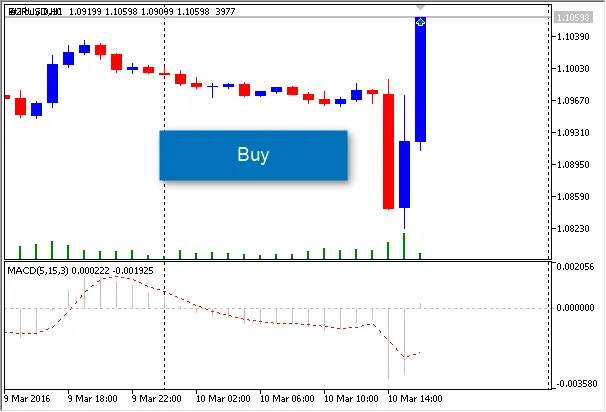
Example: Opening a Buy Position on the Chart




Comments 0