
If you're looking to enhance your trading strategies, the Exp_Super_Trend EA for MetaTrader 5 might just be your new best friend. This trading system is built around the signals generated by the Super_Trend indicator. The magic happens when a bar closes and the indicator changes color, indicating a potential trading opportunity.
To get started with this Expert Advisor, you'll need to have the compiled Super_Trend.ex5 indicator file handy. Simply drop it into your <terminal_data_folder>\MQL5\Indicators directory, and you’re good to go!
It’s important to note that the TradeAlgorithms.mqh library file is necessary for running Expert Advisors with brokers that offer a non-zero spread. This library also gives you the flexibility to set your Stop Loss and Take Profit levels right when you open a position. If you're looking for more options, you can download additional variants of the library here: Trade Algorithms.
During the testing phase, we utilized the default input parameters for the Expert Advisor, and we didn’t apply Stop Loss or Take Profit settings in the tests. Check out some of the results below:
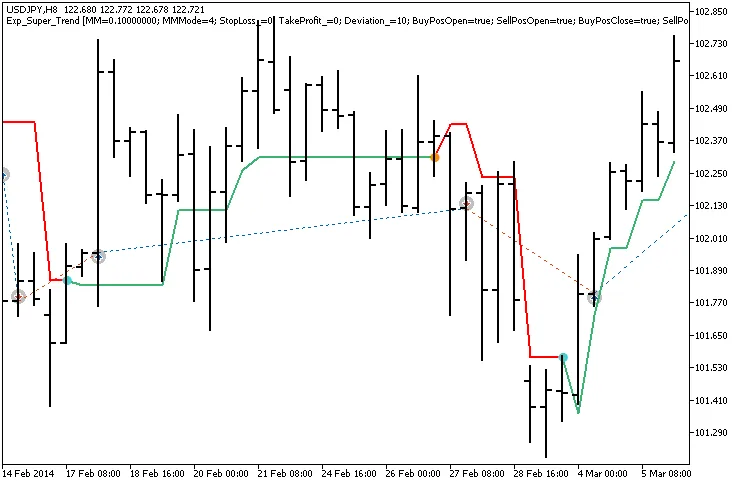
Fig. 1. Trade examples on the chart
Now, let’s dive into the testing results for 2014 on the USDJPY H8:
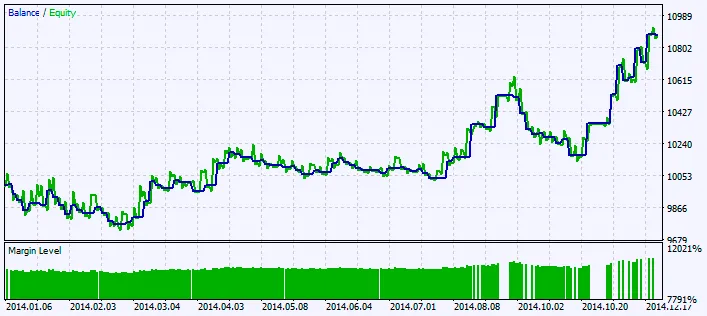
Fig. 2. Chart of testing results




Comments 0