
If you're looking to enhance your trading strategy, the MQL5 Wizard is a fantastic tool that lets you create Expert Advisors (EAs) tailored to your trading style. This guide focuses on crafting a trading system based on the Hammer and Hanging Man candlestick patterns, confirmed by the Market Facilitation Index (MFI).
To jumpstart your trading, you need to set up your custom trading signals class. A great starting point is to derive your class from CExpertSignal. You’ll want to override the LongCondition() and ShortCondition() methods to tailor them to your strategy.
Understanding the Hammer and Hanging Man Patterns
1. Hammer
The Hammer is a candlestick pattern that forms after a downward price movement, characterized by a small body and a long lower wick. This pattern signals a potential reversal from a bearish trend to bullish. The color of the candle body isn’t critical, but a bullish hammer can indicate stronger bullish potential. A Hammer often appears near the low of the preceding candle, and the longer the lower wick, the higher the likelihood of a reversal.
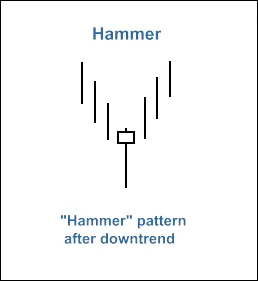
Fig. 1. The Hammer candlestick pattern
To identify a Hammer pattern, you can use the CheckPatternHammer() method in the CCandlePattern class, which checks for the right conditions.
2. Hanging Man
The Hanging Man is another critical candlestick pattern, forming after an upward price movement. Similar to the Hammer, it has a small body and a long lower wick, but it indicates the potential end of a bullish trend. Once again, the color of the body isn’t the main focus, but a bearish Hanging Man can suggest a stronger bearish reversal. This pattern typically forms near the high of the previous candle.
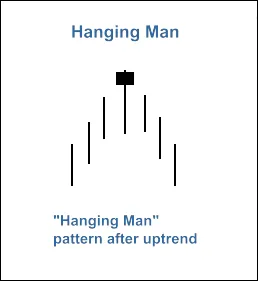
Fig. 2. The Hanging Man candlestick pattern
To recognize a Hanging Man, the CheckPatternHangingMan() method in the CCandlePattern class does the job.
Creating Trading Signals
The trade signals generated by these candlestick patterns need confirmation from the MFI indicator. For long positions, the MFI should be below 40, while for short positions, it must exceed 60. Closing trades is based on critical MFI levels: close a long position if MFI hits 70, and close a short position if it dips to 30.
Implementing Your Trading Strategy
To set up your trading system in the MQL5 Wizard, follow these steps:
- Download and place the required files,
ah_hm_mfi.mqhandacandlepatterns.mqh, in the appropriate folders. - Launch the MQL5 Wizard.
- Specify your EA's name and select the trading signal modules.
- Add the module for signals based on Hammer/Hanging Man confirmed by MFI.
- Finalize any trailing properties and money management settings.
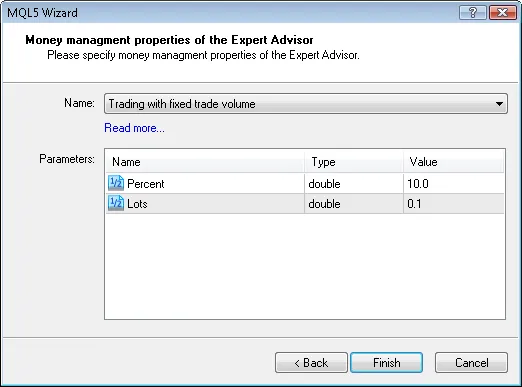
Fig. 10. Money management properties of the Expert Advisor
Once configured, the MQL5 Wizard will generate the EA code for you, which can be found in the terminal data folder. The default parameters will be set, allowing you to customize your threshold levels for opening and closing positions.
Backtesting Your Strategy
Don't forget to backtest your EA on historical data to see how well it performs. Use the Strategy Tester in MetaTrader 5 to find the best input parameters.
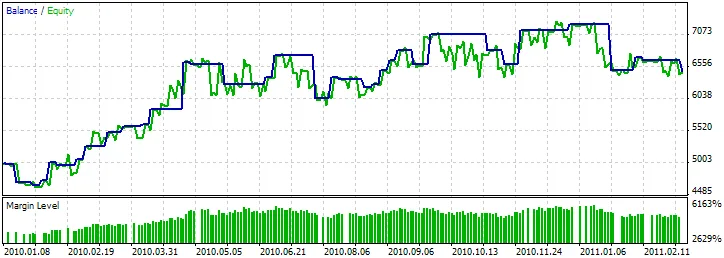
Fig. 11. Testing results of the Expert Advisor, based on Hammer/Hanging Man + MFI
This EA, powered by the MQL5 Wizard, utilizes the insights from the Hammer and Hanging Man patterns along with the MFI to make informed trading decisions. With a little patience and fine-tuning, you could have a powerful tool in your trading arsenal!




Comments 0