
MQL5 Wizard makes it a breeze to create Expert Advisors (EAs) for your trading strategies. If you want to dive deeper into creating EAs, check out Creating Ready-Made Expert Advisors in MQL5 Wizard.
In this post, we're going to explore a trend-following strategy that utilizes three moving averages. This strategy is cleverly named "Signals based on Three EMAs". It identifies the trend using three exponentially smoothed moving averages: FastEMA, MediumEMA, and SlowEMA.
Trade Signals:
- Buy Signal: FastEMA > MediumEMA > SlowEMA (indicating an upward trend).
- Sell Signal: FastEMA
The logic behind this strategy is implemented in the CSignal3EMA class (make sure to place signal3ema.mqh in the terminal_data_folder/MQL5/Include/Expert/Signal directory).
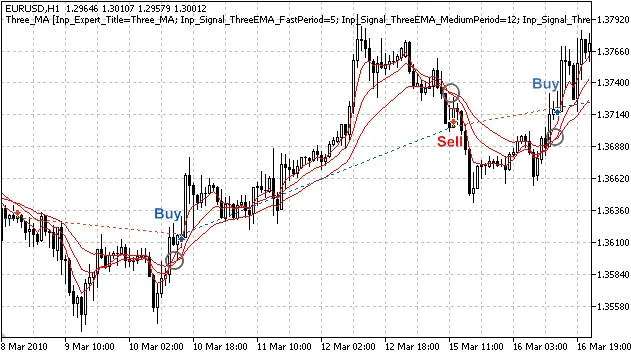
Figure 1. Trade signals based on three moving averages
Understanding Trade Signals
The CSignal3EMA class contains protected methods that simplify access to the values of the three moving averages (Fast, Medium, Slow):
double FastEMA(int ind) // returns the value of Fast EMA of the bardouble MediumEMA(int ind) // returns the value of Medium EMA of the bardouble SlowEMA(int ind) // returns the value of Slow EMA of the bar
1. Opening a Long Position
The upward trend is confirmed when: FastEMA > MediumEMA > SlowEMA:
- FastEMA(1) > MediumEMA(1): Fast EMA is above Medium EMA (on the last completed bar);
- MediumEMA(2) > SlowEMA(1): Medium EMA is above Slow EMA (on the last completed bar);
//+------------------------------------------------------------------+//| Checks conditions to open long position (buy)                     |//+------------------------------------------------------------------+bool CSignal3EMA::CheckOpenLong(double& price,double& sl,double& tp,datetime& expiration)
  {
   double medium=MediumEMA(1);
//---
   price=0.0;
   sl   =m_symbol.Ask()-m_stop_loss*m_adjusted_point;
   tp   =m_symbol.Ask()+m_take_profit*m_adjusted_point;
//--- checking for upward trend (on the last completed bar): FastEMA(1)>MediumEMA(1)>SlowEMA(1)
    return(FastEMA(1)>medium && medium>SlowEMA(1));
  }
2. Closing a Long Position
The downward trend is confirmed when: FastEMA
- FastEMA(1)
- MediumEMA(2)
//+------------------------------------------------------------------+//| Checks conditions to close long position |//+------------------------------------------------------------------+bool CSignal3EMA::CheckCloseLong(double& price) { double medium=MediumEMA(1); //--- price=0.0; //--- checking for downward trend (on the last completed bar): FastEMA(1)return(FastEMA(1) )); }1
3. Opening a Short Position
//+------------------------------------------------------------------+//| Checks conditions to open short position (sell) |//+------------------------------------------------------------------+bool CSignal3EMA::CheckOpenShort(double& price,double& sl,double& tp,datetime& expiration) { double medium=MediumEMA(1); //--- price=0.0; sl =m_symbol.Bid()+m_stop_loss*m_adjusted_point; tp =m_symbol.Bid()-m_take_profit*m_adjusted_point; //--- checking for downward trend (on the last completed bar): FastEMA(1)return(FastEMA(1) )); }1
4. Closing a Short Position
//+------------------------------------------------------------------+//| Checks conditions to close short position                        |//+------------------------------------------------------------------+bool CSignal3EMA::CheckCloseShort(double& price)
  {
   double medium=MediumEMA(1);
//---
   price=0.0;
//--- checking for upward trend (on the last completed bar): FastEMA(1)>MediumEMA(1)>SlowEMA(1)
   return(FastEMA(1)>medium && medium>SlowEMA(1));
  }
You can also refine your closing strategy for short positions: it’s not necessary to wait for an upward trend. You can close short positions when the market is flat, which can be recognized when FastEMA > MediumEMA
Building Your Expert Advisor with MQL5 Wizard
To set up your trading robot based on this strategy, simply select the signal properties as "Signals based on Three EMAs" in the MQL5 Wizard's Creating Ready-Made Expert Advisors option:
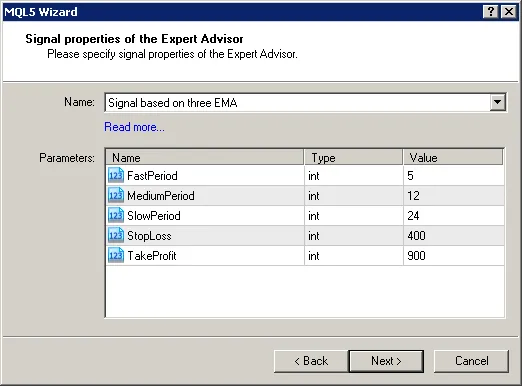
Figure 2. Select "Signals based on Three EMAs" in MQL5 Wizard
Next, choose the trailing stop algorithm and the money management system you need. The MQL5 Wizard will automatically generate the EA code for you, which you can compile and run in the Strategy Tester of the MetaTrader 5 platform.
Backtesting Results
Now, let's take a look at backtesting results for our Expert Advisor on historical data (EURUSD H1, testing period: January 1, 2010 - January 5, 2011, with FastPeriod=5, MediumPeriod=12, SlowPeriod=24, StopLoss=400, TakeProfit=900).
In creating the Expert Advisor, we utilized a fixed volume (Trading Fixed Lot, 0.1), and opted not to use a trailing stop algorithm (Trailing not used).
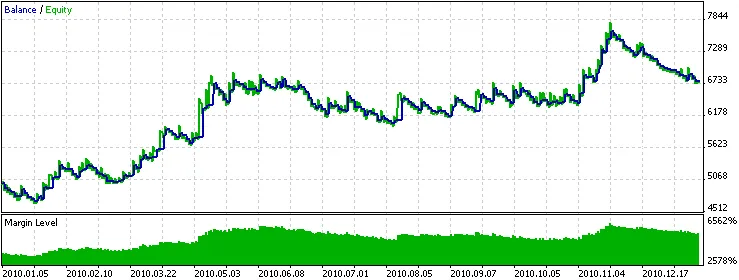
Figure 3. Historical backtesting results of the Expert Advisor based on three EMA
Attachments: Remember, the Signal3EMA.mqh with the CSignal3EMA class should be placed in terminal_data_folder/MQL5/Include/Expert/Signal. Additionally, the threeema.mq5 file contains the EA code generated using MQL5 Wizard.




Comments 0