
Hey fellow traders! If you're looking to enhance your trading strategy, let me introduce you to the XWAMI trading system. This innovative system leverages the XWAMI indicator to signal trades, adjusting the volume based on the outcomes of your previous trades. Pretty neat, right?
So, how does it work? The system generates trading signals at the close of a bar, especially when a trend shift occurs, marked by a color change in the cloud. This gives you a clear visual cue to make your next move.
Managing Your Trade Volumes
One of the standout features of this EA (Expert Advisor) is its ability to manage the volume of your open positions. The input EA variables allow you to set parameters that tailor the trading strategy to your needs:
inputuint BuyTotalMMTriger=5; // Last 5 Buy trades for stop losses countinputuint BuyLossMMTriger=3; // Number of loss-making Buy trades to lower volumeinputuint SellTotalMMTriger=5;// Last 5 Sell trades for stop losses countinputuint SellLossMMTriger=3; // Number of loss-making Sell trades to lower volumeinputdouble SmallMM_=0.01; // Portion of funds used in a trade during lossesinputdouble MM=0.1 // Portion of funds used in a trade during normal tradinginput MarginMode MMMode=LOT; // Method for calculating lot size
With these settings, if you’ve had three losing trades out of the last five in one direction, the EA will open the next trade in that direction with a volume of 0.01 lots. If you’ve got fewer than three losing trades, the volume will be set at 0.1 lots. This strategy helps to minimize risks while taking advantage of market conditions.
Getting Started
To ensure the EA runs smoothly, make sure you have the XWAMI.ex5 indicator file saved in the <terminal_data_directory>\MQL5\Indicators folder. This is crucial for the EA to function properly.
During testing, the default inputs with stops were used, and the results were promising. Check out the performance below:
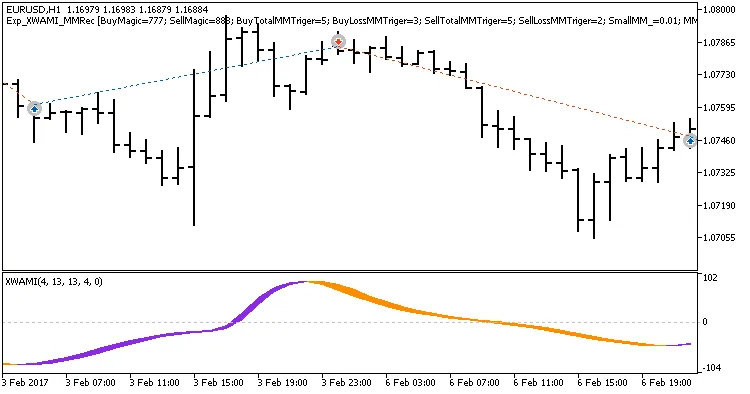
Fig. 1. Examples of trades on the chart
Here's a look at the testing results for 2017 on the EURUSD H1 timeframe:
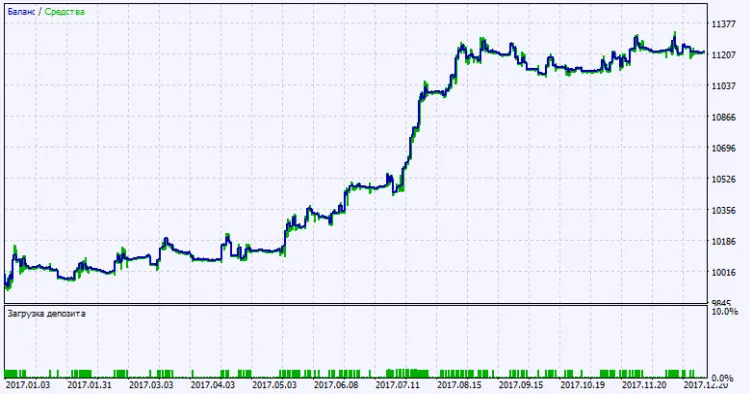
Fig. 2. Testing results chart




Comments 0