
Are you ready to take your trading game to the next level? The Ergodic Ticks Volume OSMA Expert Advisor is here to help you capitalize on market movements by utilizing the reversal signals of the Ergodic Ticks Volume OSMA histogram. This EA generates signals based on changes in the histogram direction right when a bar closes, giving you a timely opportunity to make your move.
To get started, make sure you have the compiled indicator file Ergodic_Ticks_Volume_OSMA.ex5. Simply place it in your <terminal_data_folder>\MQL5\Indicators directory, and you'll be all set to run the EA.
One key thing to note is that the TradeAlgorithms.mqh library file is crucial for using EAs with brokers that have a non-zero spread. This library also allows you to set your Stop Loss and Take Profit levels at the same time as you open a position. For more variations of this library, check out the following link: Trade Algorithms.
The default input parameters for this EA were used in the tests shown below. Just a heads up, Stop Loss and Take Profit were not applied during these tests, so keep that in mind!
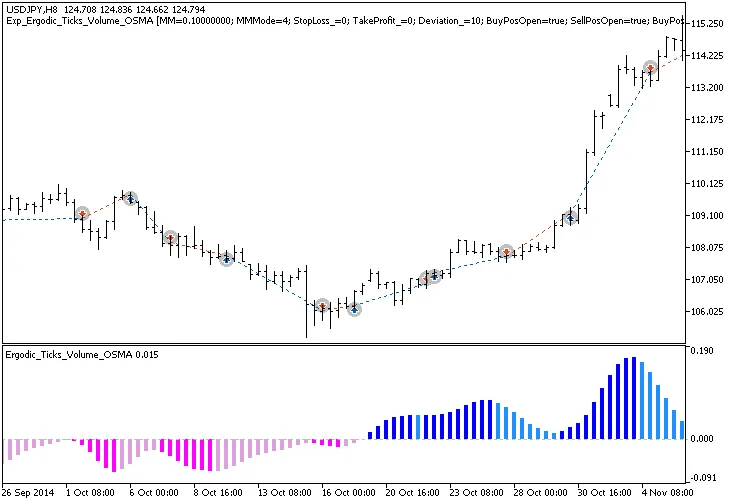
Fig.1. Trade examples on the chart
Let’s take a look at the testing results for 2014 on the USDJPY H8 timeframe:
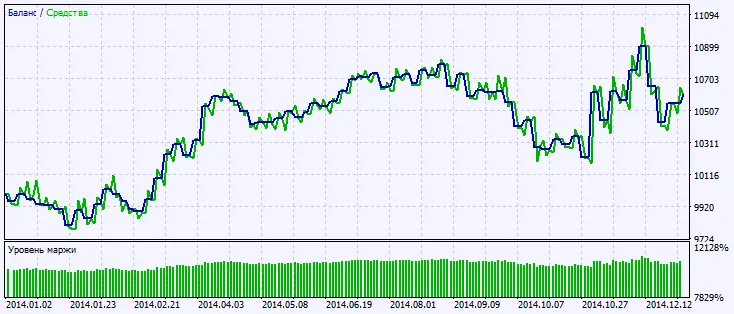
Fig.2. Testing results chart




Comments 0