
Hey fellow traders! Today, I want to share an interesting trading system that revolves around the JFatlCandle indicator. This system is designed to help you adjust your trade sizes based on the outcomes of your recent trades, giving you a more strategic edge.
The cool thing about this EA is its ability to generate trading signals whenever a bar closes and the trend shifts, which is indicated by a change in candle colors. Let’s dive into how it works!
Managing Your Trade Volumes with Input Variables
To effectively manage the volumes of your open positions, you can tweak a few key input variables:
inputuint BuyTotalMMTriger=3; // Number of recent Buy trades to set stop lossinputuint BuyLossMMTriger=2; // Number of losing Buy trades to adjust MMinputuint SellTotalMMTriger=3;// Number of recent Sell trades to set stop lossinputuint SellLossMMTriger=2; // Number of losing Sell trades to adjust MMinputdouble SmallMM_=0.01; // Portion of your deposit for trades in case of a lossinputdouble MM=0.1 // Portion of your deposit for regular tradinginput MarginMode MMMode=LOT; // Method for determining lot size
With these inputs, the EA will analyze the last five trades. If three of those were losses in a single direction, it will open the next trade in that direction at a volume of 0.01 lots. If there were fewer than three losing trades, it will use a volume of 0.1 lots for that position.
Setting Up the EA
To ensure that the EA runs smoothly, make sure to have the compiled files for the indicators JFatl.ex5 and JFatlCandle.ex5 stored in your <terminal_data_directory>\\MQL5\Indicators folder. This is crucial for its proper operation.
For the tests shown below, we used the default input parameters of the Expert Advisor, which do not include stop losses.
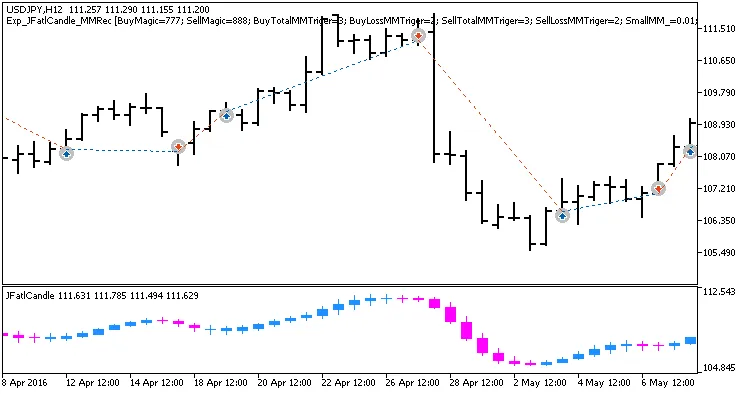
Fig. 1. Examples of trades on the chart
Testing Results for USDJPY on H12
Here’s a look at the testing results for the USDJPY pair on the H12 timeframe during the year 2017:
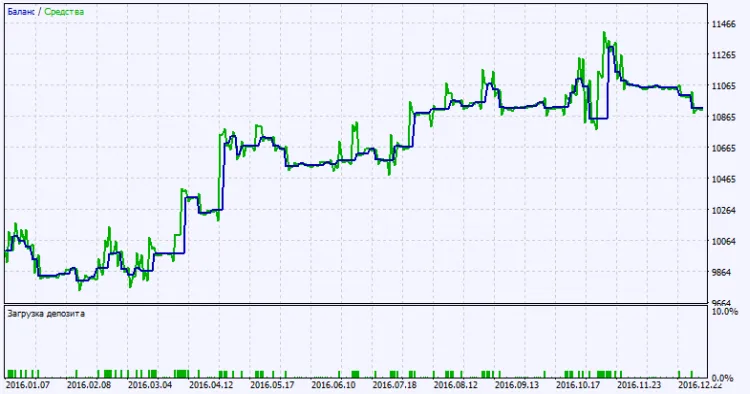
Fig. 2. Test results chart




Comments 0