
If you're looking to boost your trading game, the Aroon Oscillator Sign Alert is worth considering. This system is built around the Aroon Oscillator indicator, which signals trades at the close of a bar when a color icon appears. It's a handy tool that helps you make informed decisions in the market.
To get started, simply place the compiled files AroonOscillator.ex5 and AroonOscillatorSignAlert.ex5 into your <terminal_data_folder>\MQL5\Indicators directory. Once that's done, you'll be set to receive signals right in your MetaTrader 5 setup.
It’s also important to note that the TradeAlgorithms.mqh library file allows you to use Expert Advisors (EAs) with brokers that offer nonzero spreads. Plus, it enables you to set your Stop Loss and Take Profit levels at the same time you open a position. If you're interested in exploring more variations of this library, check it out here: Trade Algorithms.
The testing results below utilize the default input parameters for the Expert Advisor. Keep in mind that Stop Loss and Take Profit were not applied during these tests, which is an important consideration when evaluating performance.
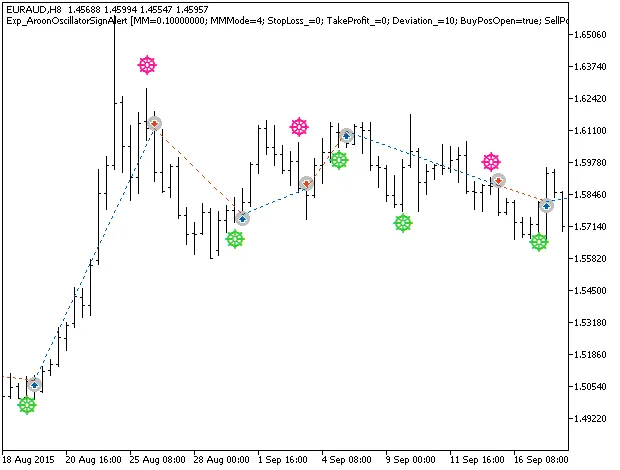
Fig. 1. The instances of history of deals on the chart.
Now, let’s take a look at the testing results from 2015 on the EURAUD H8 pair:
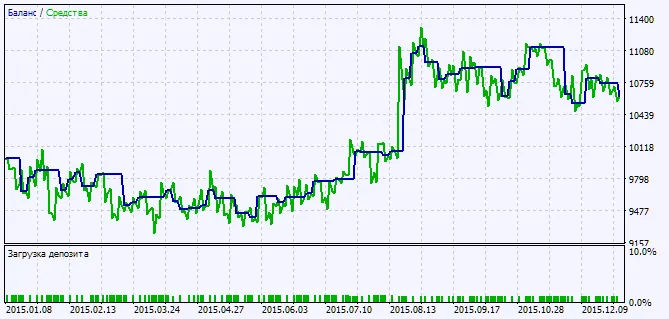
Fig. 2. Testing results chart




Comments 0