
Are you ready to take your trading game to the next level? Introducing the Skyscraper_Fix_ColorAML_X2MACandle Expert Advisor (EA) for MetaTrader 5! This powerhouse combines three independent trading systems utilizing the Skyscraper_Fix, ColorAML, and X2MACandle indicators, all packed into one efficient EA.
The magic happens as the EA dynamically adjusts the volume of upcoming trades based on the outcomes of previous ones. You'll receive trading signals right when a bar closes, indicating a trend change, as shown by any of the three indicators altering their colors.
This EA is an enhanced version of the Exp_Skyscraper_Fix_ColorAML and Exp_Skyscraper_Fix_ColorAML_MMRec codes, adding the X2MACandle indicator into the mix for even more trading opportunities.
The EA's inputs are organized into three categories—A, B, and C—based on the indicators used:
- A - Skyscraper_Fix;
- B - ColorAML;
- C - X2MACandle;
To get the most out of each system, you'll need to configure them individually by disabling the others in the EA inputs:
inputbool A_BuyPosOpen=true; //A Permission to enter long positionsinputbool A_SellPosOpen=true //A Permission to enter short positions
For smooth operation, ensure that the compiled files for the indicators Skyscraper_Fix.ex5, ColorAML.ex5, and X2MACandle.ex5 are located in your <terminal_data_directory>\MQL5\Indicators folder.
During the tests below, we utilized the default input parameters for the Expert Advisor, with no Stop Loss or Take Profit settings applied.
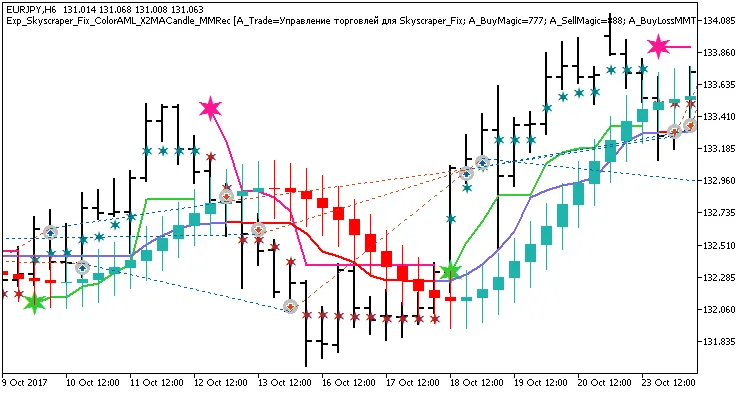
Fig. 1. Examples of trades on the chart
Here are the testing results for 2017 on the EURJPY H6 timeframe:
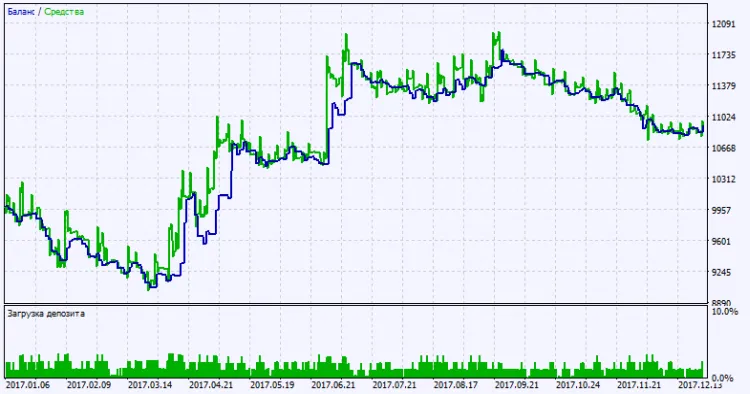
Fig. 2. Test results chart




Comments 0