
If you're looking to boost your trading game, the Exp_TotalPowerIndicatorX is a must-have Expert Advisor for MetaTrader 5. This tool leverages the signals from the TotalPowerIndicatorX oscillator and allows you to set precise trading time intervals.
So, how does it work? A trade signal is generated when the bar closes, specifically when the color of the indicator cloud changes—this happens when the main indicator line crosses over the signal line.
To trade within a specific timeframe, you can configure the trading hours through the input parameters:
inputbool TimeTrade=true; // Enable trading in the specified intervalinput HOURS StartH=ENUM_HOUR_0; // Start hour of tradinginput MINUTS StartM=ENUM_MINUT_0; // Start minute of tradinginput HOURS EndH=ENUM_HOUR_23; // End hour of tradinginput MINUTS EndM=ENUM_MINUT_59; // End minute of trading
You'll notice that there are two sets of variables—one for the trading start time and another for the end time. By default, the Expert Advisor is set to trade the entire session, starting at 00:00 and closing all positions by 23:59.
Keep in mind, if your start time is later than your end time, the Expert Advisor will close positions on the following day at the specified end time.
For the Exp_TotalPowerIndicatorX to operate smoothly, make sure to save the TotalPowerIndicatorX.ex5 compiled indicator file in your <terminal_data_folder>\MQL5\Indicators directory.
Also, the TradeAlgorithms.mqh library file is compatible with brokers offering nonzero spreads and lets you set Stop Loss and Take Profit right at the moment of opening a position. You can find more versions of this library here: Trade Algorithms.
During the tests below, we utilized the default input parameters of the Expert Advisor. Notably, Stop Loss and Take Profit were not applied during testing.
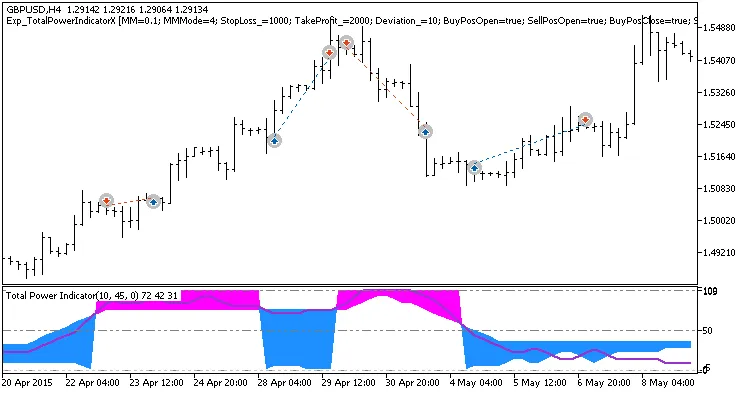
Fig. 1. Examples of deals on the chart
Here's a look at the testing results for 2015 using GBPUSD on the H4 timeframe:
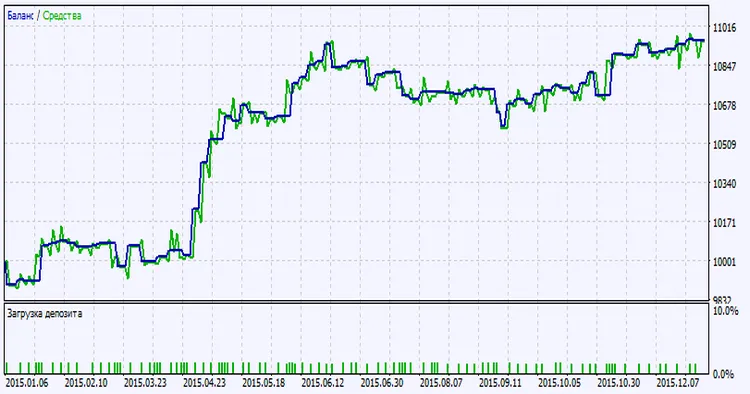
Fig. 2. Testing results chart




Comments 0