
Welcome, fellow traders! Today, we're diving into an exciting trading system that utilizes the ForexProfitBoost_2nb indicator.
So how does it work? The trade signals kick in when the trend direction shifts, which is indicated by the bars changing color from blue to pink and vice versa. It's as simple as that!
To get started with this Expert Advisor, you'll need the compiled indicator file ForexProfitBoost_2nb.ex5. Make sure to place it in your <terminal_data_folder>\\MQL5\Indicators directory.
One key note: the TradeAlgorithms.mqh library file is essential for using Expert Advisors with brokers that offer a non-zero spread. It also includes the option to set Stop Loss and Take Profit right when you open a position. If you're looking for more options, you can grab additional variants of the library at this link.
For the tests shown below, we used the default input parameters for the Expert Advisor, skipping Stop Loss and Take Profit during testing.
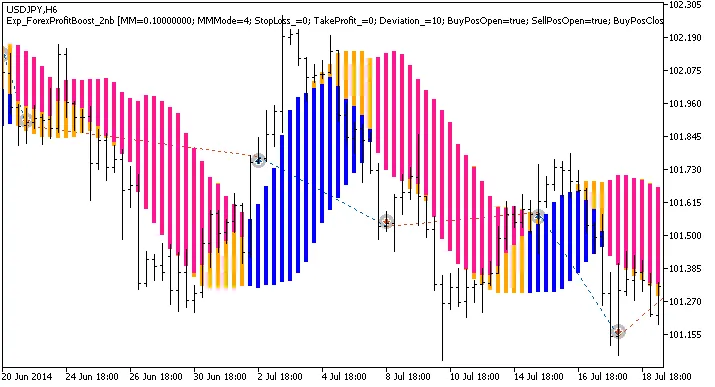
Fig. 1. Examples of deals on the chart
Now, let's take a look at the testing results for 2014 on the USDJPY H6:
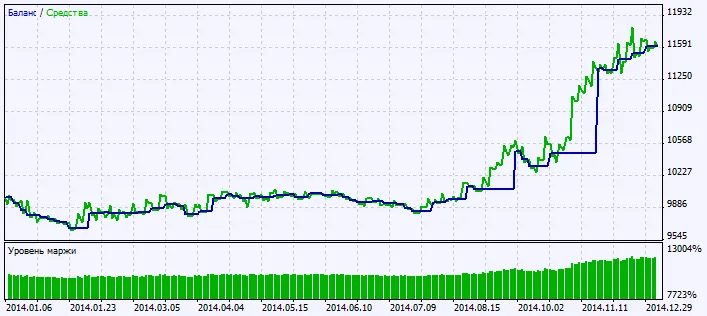
Fig. 2. Testing results chart




Comments 0