
Hey fellow traders! Today, I want to introduce you to a handy tool that could boost your trading game—the Ergodic Ticks Volume Indicator Expert Advisor. This EA is designed to work seamlessly with the Ergodic Ticks Volume Indicator oscillator, which you might already be familiar with.
So, how does it work? The EA generates signals based on the crossing of the indicator's main and signal lines right at the close of each bar. It’s a pretty straightforward way to spot potential trade setups!
To get started, you’ll need the Ergodic_Ticks_Volume_Indicator.ex5 compiled indicator file. Make sure to drop it in your <terminal_data_folder>\MQL5\Indicators directory, and you’re good to go.
One thing to keep in mind is that this EA uses the TradeAlgorithms.mqh library, which is a fantastic resource for traders dealing with brokers that have nonzero spreads. It also lets you set your Stop Loss and Take Profit right when you open a position, giving you more control over your trades. If you want to explore more variants of this library, you can find them here: Trade Algorithms.
The testing results shown below were obtained using the default input parameters for the Expert Advisor. Notably, Stop Loss and Take Profit settings were not applied during these tests, so keep that in mind.
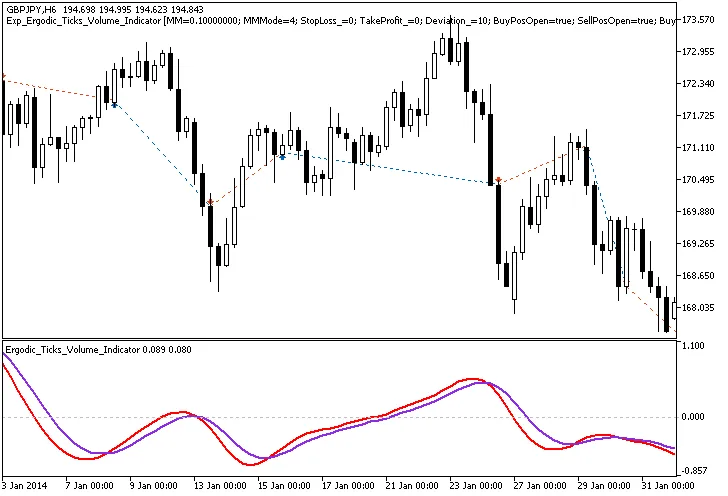
Fig.1. Trade examples on the chart
Now, let’s take a look at the testing results for 2014 on the GBPJPY H6:
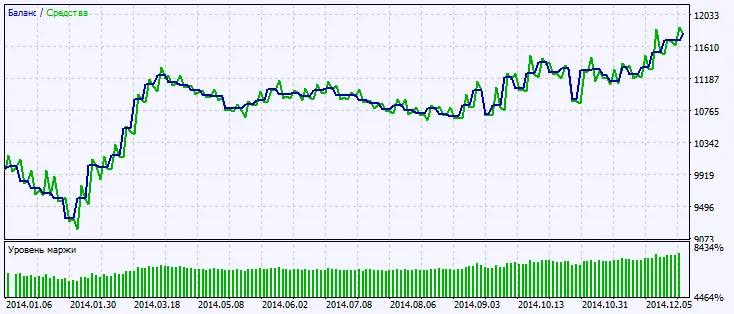
Fig.2. Testing results chart




Comments 0