
Welcome, fellow traders! Today, I want to introduce you to a powerful trading system built around the ColorXvaMA_Digit_StDev indicator. This tool generates signals at the close of a bar whenever a colored point appears on the indicator. If the indicator flips direction and goes against your open position, that's your cue to exit the market.
To get started with this Expert Advisor (EA), you'll need to have the compiled indicator file, ColorXvaMA_Digit_StDev.ex5. Simply drop it into your terminal’s indicator folder located at terminal_data_folder\MQL5\Indicators.
One of the great features of this EA is that it utilizes the TradeAlgorithms.mqh library. This means you can trade with brokers offering a nonzero spread and set your Stop Loss and Take Profit right when you open a position. Looking for more options? You can find a variety of library versions here: Trade Algorithms.
The tests presented below used the default input parameters for the Expert Advisor, and it's worth noting that neither Stop Loss nor Take Profit was included in these tests.
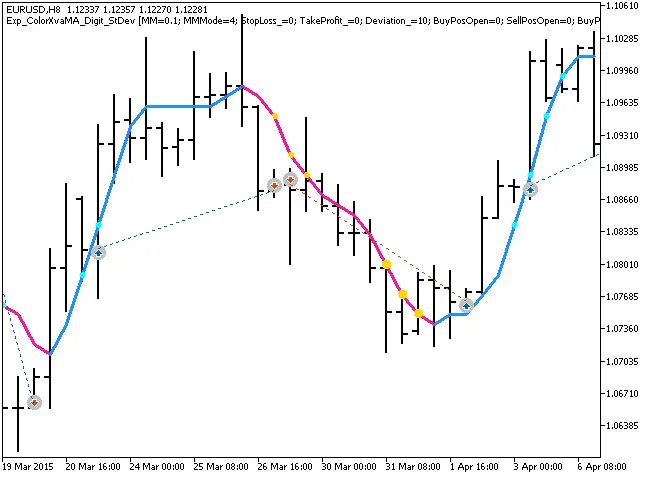
Fig. 1. Examples of trades on the chart
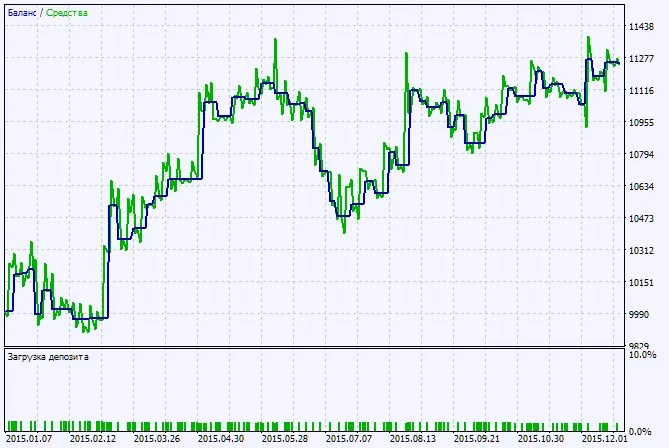
Now, let’s dive into the testing results for the year 2015, focusing on the EURUSD pair on the H8 timeframe:
View Chart
Fig. 2. Chart of testing results




Comments 0