
If you're diving into automated trading, the Fisher CG Oscillator EA could be your new best friend. This Expert Advisor (EA) is designed to leverage signals from the Fisher CG Oscillator, helping you make informed trading decisions.
The magic happens when a bar closes and the main and signal lines of the indicator cross. This crossover can provide you with valuable entry and exit signals.
To get started, you'll need to have the compiled version of the FisherCGOscillator.ex5 indicator. Just drop it into your MetaTrader terminal's data folder: terminal_data_folder\MQL5\Indicators.
A quick heads up: the TradeAlgorithms.mqh library file is essential if you're working with brokers that feature a nonzero spread. Plus, it gives you the ability to set your Stop Loss and Take Profit levels right when you open a position. If you're looking for more options, check out the different variants of the library here: Trade Algorithms.
For the tests discussed below, we used the default input parameters for the EA. Notably, we didn’t employ Stop Loss or Take Profit during these tests.
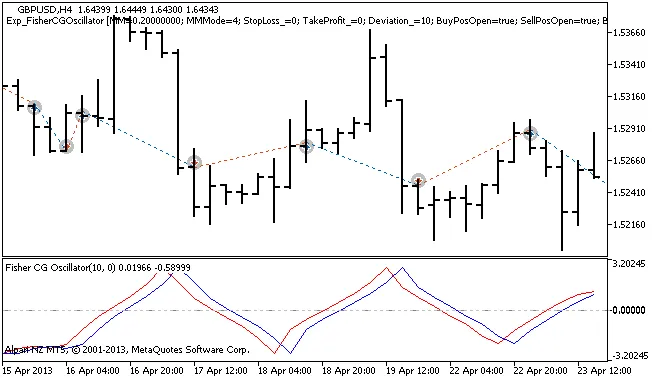
Figure 1: History of deals illustrated on the chart.
Let’s take a look at the testing results for 2013 using the GBPUSD on the H4 timeframe:
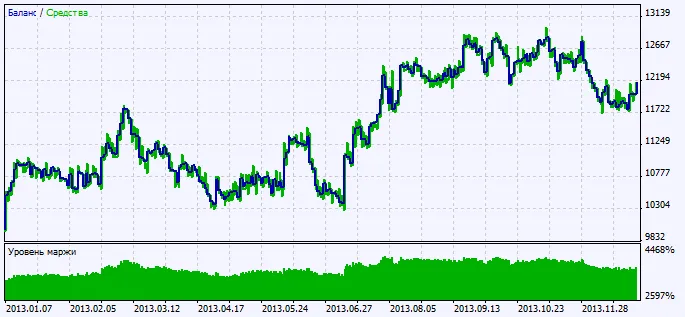
Figure 2: Overview of testing results.




Comments 0