
大家好!今天我们来聊聊 Color Day 指标,它能帮助我们直观地识别市场的多头和空头日。
如何使用 Color Day 指标
当日的收盘价高于开盘价时,指标会将这一天标记为蓝色(颜色可以在设置中自定义)。
input color UP = Blue; // 多头日的颜色
如果当日的收盘价低于开盘价,则会将其标记为红色(同样可以在设置中自定义)。
input color DN = Red; // 空头日的颜色
获取指定天数的开盘、收盘价格和时间
我们可以使用以下代码来获取指定天数内的开盘价、收盘价和开市时间:
CopyTime(NULL, PERIOD_D1, 0, Days + 1, tm);
CopyOpen(NULL, PERIOD_D1, 0, Days + 1, op);
CopyClose(NULL, PERIOD_D1, 0, Days + 1, cl);
设置数组的维度
在将指标安装到图表之前,首先需要设置数组的维度:
int OnInit()
{
    //--- 指标缓冲区映射
    Comment(""");
    ArrayResize(tm, Days);
    ArrayResize(op, Days);
    ArrayResize(cl, Days);
    //---
    return(INIT_SUCCEEDED);
}
确定每日收盘时间
接下来,我们需要将数组单元格的值赋给变量,并确定每日的收盘时间 time1:
datetime time0 = tm[i];
datetime time1 = time0 + 3600 * 24;
double dopen = op[i];
double dclose = cl[i];
使用 PutRect() 函数绘制矩形
我们可以使用 PutRect() 函数来绘制矩形:
void PutRect(string name,datetime t1,double p1,datetime t2,double p2,color clr)
{
    ObjectDelete(0, name);
    //--- 根据给定坐标创建矩形
    ObjectCreate(0, name, OBJ_RECTANGLE, 0, t1, p1, t2, p2);
    //--- 设置矩形颜色
    ObjectSetInteger(0, name, OBJPROP_COLOR, clr);
    //--- 启用(true)或禁用(false)矩形的填充模式
    ObjectSetInteger(0, name, OBJPROP_FILL, true);
}
根据价格变化为当天上色
通过以下代码,我们可以根据价格的变化来为当天上色:
if(dclose < dopen) PutRect("Rect" + (string)dopen, time0, dopen, time1, dclose, DN);
if(dclose > dopen) PutRect("Rect" + (string)dopen, time0, dopen, time1, dclose, UP);
循环遍历指定天数
我们可以通过循环遍历所有指定的 Days 参数来处理数据:
for(int i = 0; i <= Days; i++)
{
    CopyTime(NULL, PERIOD_D1, 0, Days + 1, tm);
    CopyOpen(NULL, PERIOD_D1, 0, Days + 1, op);
    CopyClose(NULL, PERIOD_D1, 0, Days + 1, cl);
    datetime time0 = tm[i];
    datetime time1 = time0 + 3600 * 24;
    double dopen = op[i];
    double dclose = cl[i];
    if(dclose < dopen) PutRect("Rect" + (string)dopen, time0, dopen, time1, dclose, DN);
    if(dclose > dopen) PutRect("Rect" + (string)dopen, time0, dopen, time1, dclose, UP);
}
删除图表上的对象
使用 DeleteObjects() 函数可以删除图表上的对象:
void DeleteObjects()
{
    for(int i = ObjectsTotal(0, 0, OBJ_RECTANGLE) - 1; i >= 0; i--)
    {
        string name = ObjectName(0, i, 0, OBJ_RECTANGLE);
        if(StringFind(name, "Rect", 0) >= 0) ObjectDelete(0, name);
    }
}
移除创建的对象
我们还需要在 OnDeinit 函数中移除创建的对象:
void OnDeinit(const int reason)
{
    Comment(""");
    DeleteObjects();
}
设置参数
设置:
input int Days = 11;  // 计算的天数
input color UP = Blue;  // 多头日的颜色
input color DN = Red;  // 空头日的颜色
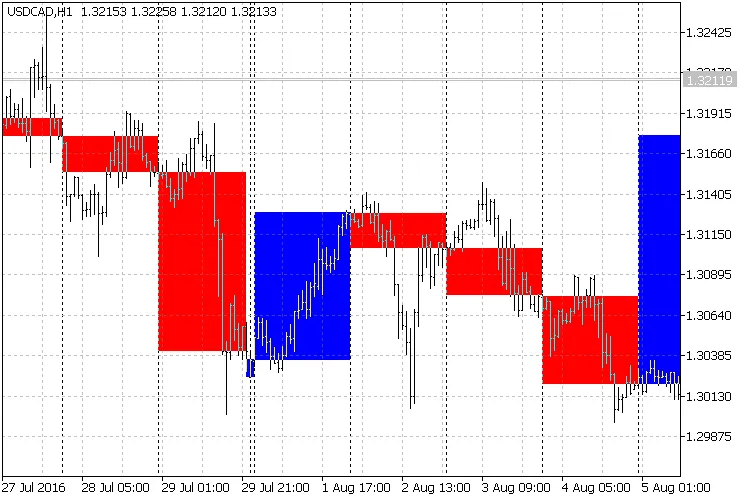
图 1. 指标在图表上的显示
小贴士
- Color Day 指标是您视觉交易的得力助手。




评论 0