
Hey there, fellow traders! If you're looking to step up your trading game, the Breakout Bars Trend v2 indicator is worth checking out. Unlike traditional moving averages, this tool focuses purely on price movements, which can provide a more accurate picture of market trends.
This indicator uses delta as a reversal parameter, but here’s the twist: it’s based on the extremes—specifically, the high and low prices—rather than just the closing prices. A significant aspect of this tool is the breakout bar, which occurs when the price breaks above the high or below the low of the previous bar. Think of it as a fresh signal that can lead you to new trading opportunities.
What's New in Breakout Bars Trend v2?
- Reversal parameter can be defined in both pips and percentages.
- Option to enable or disable the display of reversal levels.
- Control over the visibility of the latest trend information.
- Not just counts, but also the size in pips of the breakout bars from previous trends.
Settings You Should Know
- Reversal: Choose your calculation mode—pips or percentage.
- Delta: Set the minimum distance required for a trend change, whether in pips or percentage.
- Display Reversal Levels: Toggle to show (true) or hide (false) reversal levels.
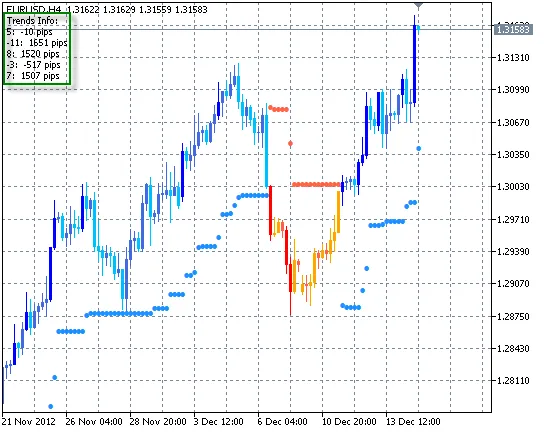
- Display Trend Info: Enable (true) or disable (false) the display of the last trend info, including the number of breakout bars and their pip distance.
- Number of Trends: Specify how many recent trends to display, which only makes sense if the previous setting is on.
Here’s a look at the Breakout Bars Trend v2 in action with a 1% delta:
Recommendations for Use
- The primary goal here is to identify the trend direction. Pair this indicator with other tools to pinpoint your entry and exit points.
- You can also use it on its own. For example, if the last few series show no more than 1-3 breakout bars, or if the last trends have a negative size, it might indicate a flat market. This often precedes a strong upward trend.
Important Note
To ensure the indicator displays correctly, go to the chart properties (hit F8), navigate to the General tab, and uncheck the “Chart above” option.




Comments 0