
What Are Vertical Time Lines?
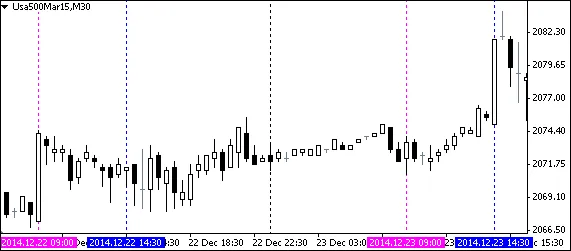
If you're looking to boost your trading game, Vertical Time Lines in MetaTrader 4 can be a game-changer. This handy indicator allows you to set up to six vertical lines at specific times, giving you the power to visually mark important moments in your trading day.
Key Features
- Draws up to six vertical lines at designated times.
- Each line can be repeated historically for better planning.
- Time format is straightforward: hh:mm.
- The default setting for historical days is 50, but feel free to increase it if needed—just keep in mind that older hardware might struggle with higher numbers.
How Can You Use Vertical Time Lines?
Here are some practical applications:
- Mark the opening and closing times of trading sessions.
- Highlight the times for regular news releases.
- Indicate any other significant timings relevant to your trading strategy.
Important Notes
- If you set a Vertical Time Line at 09:30 on a timeframe of M30 or lower, it will display as 09:30, since each candle opens at that time.
- However, if you’re on an H1 timeframe or higher, it will display as 09:00 because 09:30 falls within the 09:00 - 10:00 candle.
Customizing Your Vertical Time Lines
Comment: The current setup accommodates six vertical lines. If you need more, just repeat the relevant code blocks and rename them accordingly.
Edit Default Inputs
To permanently modify the default settings, you can edit the code below:
- Change settings for Line_x_Color (like DodgerBlue, etc.), Line_x_Visible (true or false), Line_x_Time (08:30, etc.), Line_x_Width (1, 2, 3, 4, or 5), and Line_x_Style (0=solid, 1=dash, 2=dotted, 3=dash & dot, 4=double dotted dash & dot).
- For a basic guide on editing, check out this resource.
- Find MQL4 color names and references here.
// DEFAULT INPUTS : START
//-----------------------------------------------------
input int Historical_Days = 50; // Historical days

input color  Line_1_Color = DodgerBlue; // Line 1  Color
input bool   Line_1_Visible = true;     // Line 1  Visible
input string Line_1_Time = "08:00";     // Line 1  Time
input LW     Line_1_Width = 1;          // Line 1  Width
input ENUM_LINE_STYLE Line_1_Style = 2; // Line 1  Style

input color  Line_2_Color = DodgerBlue; // Line 2  Color
input bool   Line_2_Visible = true;     // Line 2  Visible
input string Line_2_Time = "09:00";     // Line 2  Time
input LW     Line_2_Width = 1;          // Line 2  Width
input ENUM_LINE_STYLE Line_2_Style = 2; // Line 2  Style

input color  Line_3_Color = Magenta;    // Line 3  Color
input bool   Line_3_Visible = false;    // Line 3  Visible
input string Line_3_Time = "10:00";     // Line 3  Time
input LW     Line_3_Width = 1;          // Line 3  Width
input ENUM_LINE_STYLE Line_3_Style = 2; // Line 3  Style

input color  Line_4_Color = Magenta;    // Line 4  Color
input bool   Line_4_Visible = false;    // Line 4  Visible
input string Line_4_Time = "11:00";     // Line 4  Time
input LW     Line_4_Width = 1;          // Line 4  Width
input ENUM_LINE_STYLE Line_4_Style = 2; // Line 4  Style

input color  Line_5_Color = DarkOrange; // Line 5  Color
input bool   Line_5_Visible = false;    // Line 5  Visible
input string Line_5_Time = "12:00";     // Line 5  Time
input LW     Line_5_Width = 1;          // Line 5  Width
input ENUM_LINE_STYLE Line_5_Style = 2; // Line 5  Style

input color  Line_6_Color = DarkOrange; // Line 6  Color
input bool   Line_6_Visible = false;    // Line 6  Visible
input string Line_6_Time = "13:00";     // Line 6  Time
input LW     Line_6_Width = 1;          // Line 6  Width
input ENUM_LINE_STYLE Line_6_Style = 2; // Line 6  Style
//-----------------------------------------------------
// DEFAULT INPUTS : END




Comments 0