
Introduction to ElliottWaveMaker 3.0
If you're trading on MetaTrader 5, you might have heard of ElliottWaveMaker 3.0. This powerful tool is designed to enhance your trading strategy by providing advanced features for Elliott Wave analysis. Let’s dive into what this latest version offers!
New Features in Version 3.0
One of the standout features of ElliottWaveMaker 3.0 is its ability to draw Andrew's Pitchforks. Here's how it works:
- To start labeling your waves, simply press the Shift key and select three wave labels.
- Once you've labeled your waves, right-click on the third label to generate the Pitchforks.
- If you want to deselect the labels, just press Shift again and click on any wave label.
- You can easily delete any created waves by selecting the labels and left-clicking on the third label.
Enhance Your Analysis with Additional Tools
ElliottWaveMaker 3.0 also allows you to display extra tools associated with Andrew's Pitchforks. Here’s how you can toggle them:
- D - Show/hide the upper warning lines.
- F - Show/hide the lower warning lines.
- U - Show/hide Schiff lines.
More New Functions to Explore
This version comes packed with even more functionalities:
- Show/hide horizontal, vertical, and price labels of a selected label using T, B, and G keys, respectively.
- Show/hide all horizontal, vertical, and price labels with Y, N, and H keys, respectively.
- Display a vertical line on a zero bar with the M key.
- Copy your chart with labels by pressing the J key.
Visual Example
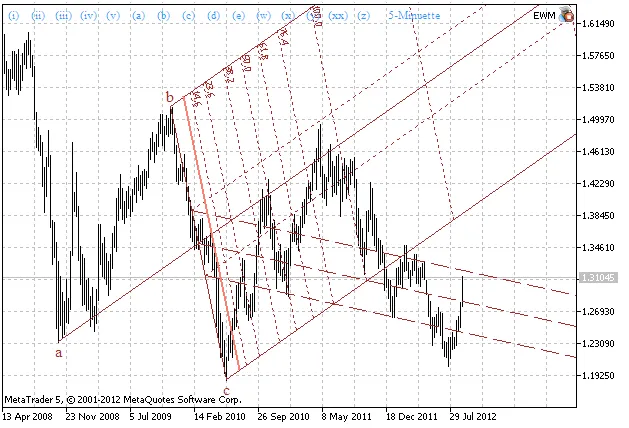
Fig. 1: Andrew's Pitchforks drawn using ElliottWaveMaker 3.0




Comments 0