
Author: Vladimir Khlystov
If you’re on the lookout for a simple yet effective Expert Advisor (EA) for MetaTrader 5, let me introduce you to the Fractal WPR. This EA operates based on the Williams Percent Range (WPR) indicator. It’s designed to sell when the oscillator crosses below the overbought level and buy when it crosses above the oversold level. The magic happens when a bar closes, signaling that a crossover has occurred.
To get started, you’ll want to place the Fractal_WPR.ex5 file in your <terminal_data_folder>\MQL5\Indicators directory.
What’s great about the Exp_Fractal_WPR.ex5 file is that it already includes the Fractal WPR indicator as a resource. This means you don’t have to have the indicator sitting in your terminal folder for the EA to function. The EA’s code has been neatly packaged to include this indicator directly within its executable file.
The indicator is included as a resource at the global scope:
#resource \Indicators\Fractal_WPR.ex5
In addition, the path for accessing the indicator has been modified within the OnInit() function:
InpInd_Handle=iCustom(Symbol(), InpInd_Timeframe, "::Indicators\Fractal_WPR", e_period, normal_speed, IPC, 0);
This means you can use the compiled EA on any trading terminal without needing the original indicator.
Keep in mind that the TradeAlgorithms.mqh library allows you to utilize Expert Advisors with brokers offering nonzero spreads and let you set Stop Loss and Take Profit when opening a position. You can explore more options within this library by following this link: Trade Algorithms.
During the testing that follows, we used the default input parameters for the Expert Advisor. Notably, Stop Loss and Take Profit settings were not applied during these tests.
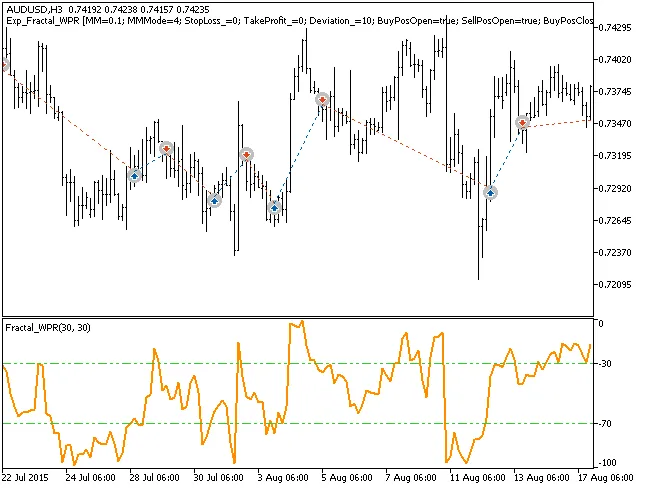
Fig. 1. Examples of deals on the chart
Here are the testing results for 2015 using the AUDUSD on the H3 timeframe:
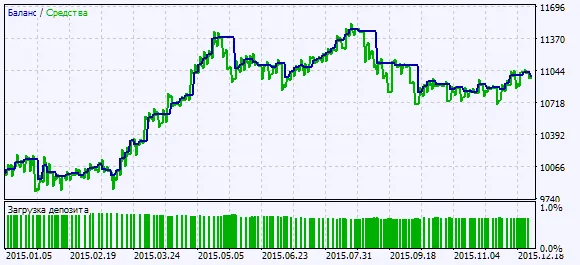
Fig. 2. Chart of testing results




Comments 0